
AI model
Azure OpenAI GPT-4
Writes answers with citations and follow-up suggestions
Employees were losing time searching folders of company documents, and there was no reliable way to control who could see what. We built an AI assistant inside SharePoint that answers from those documents, with each answer limited to what the employee is allowed to access.
| Industry | Engagement | Duration | Platform |
|---|---|---|---|
| Agriculture (agricultural products) | Managed, hybrid delivery | 21 weeks | Microsoft Azure and SharePoint Online |
An agricultural products company kept its working knowledge in Word documents and PDFs spread across many folders in SharePoint. Employees needed quick, accurate answers from them, and three problems got in the way.
Finding information was slow. Staff searched folder by folder to find the right document and the right section, which slowed down day-to-day work.
Manual searching caused mistakes. With so much documentation, people sometimes worked from the wrong or outdated document.
Access had to be controlled per document. Different teams were allowed to see different documents. Any tool that answered questions from them had to respect those permissions to stay secure and compliant.
We designed the assistant around four decisions.
Put it where people already work. The assistant sits on a SharePoint page, so employees ask questions without leaving the tool that holds their documents.
Answer only from the company's documents. Each answer is written from the documents that match the question, with citations, so people can check the source.
Respect every document's permissions. Searches are filtered by the employee's Microsoft Entra ID groups, so the assistant only uses documents that person is allowed to see.
Keep the content current automatically. New and changed documents are picked up and re-indexed without anyone having to do it by hand.
The build ran over 21 weeks as a managed engagement with hybrid delivery. It came together in six parts.
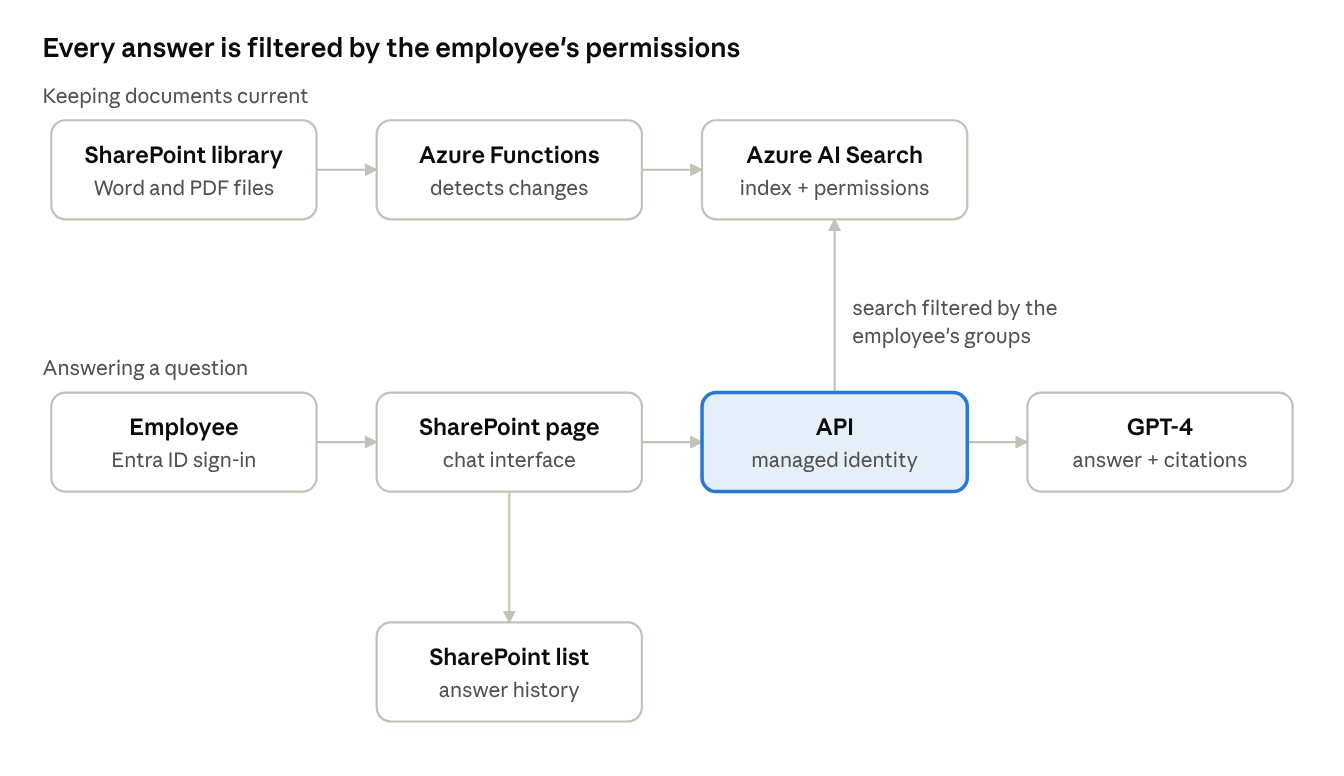
Document ingestion. An Azure Functions job reads the SharePoint document library through the Microsoft Graph API, detects new and changed files, and re-indexes them in Azure AI Search, along with the groups allowed to see each document.
Sign-in. Employees sign in with their Microsoft Entra ID account and use the assistant from a SharePoint page.
Permission-filtered search. An API, running on Azure App Service with a managed identity, searches Azure AI Search with a filter for the employee's groups. Only documents that person can access are returned.
Answers with citations. The API passes the question and the permitted passages to GPT-4 on Azure OpenAI, which writes the answer with citations and suggested follow-ups.
Role-based starter questions. Depending on the employee's Entra ID group or department, the assistant suggests relevant questions from an internal prompt library to get them started.
Conversation history. Each employee's previous answers are saved to a SharePoint list so they can find them again.
Results reported after launch:
| Result | What changed |
|---|---|
| 50% less time | Spent searching for information in company documents |
| 30% more productive | Employee productivity, with answers available in one place |
| About $100,000 a year | Saved by automating document retrieval and reducing errors |
| Document-level access | Every answer respects the employee's Entra ID permissions |
Faster, more reliable answers. Employees get answers from the right document in one place, with citations they can check, instead of searching folders.
Security and compliance built in. Document permissions carry through to every answer, so adopting AI didn't widen access to sensitive information.
Less manual effort. Ingestion and re-indexing run automatically, so keeping the assistant current takes no ongoing work from staff.
Ready to extend. The same setup can take on new document sets and use cases elsewhere in the company.
Azure OpenAI GPT-4
Writes answers with citations and follow-up suggestions
Azure AI Search
Indexes documents and returns only those the user may see
Azure Functions, Microsoft Graph API
Reads SharePoint, detects changes and re-indexes
Azure App Service, SharePoint Online
API with managed identity; chat interface on a SharePoint page
Microsoft Entra ID
Sign-in, group-based document access and role-based starter questions
SharePoint document library and list
Source documents and answer history