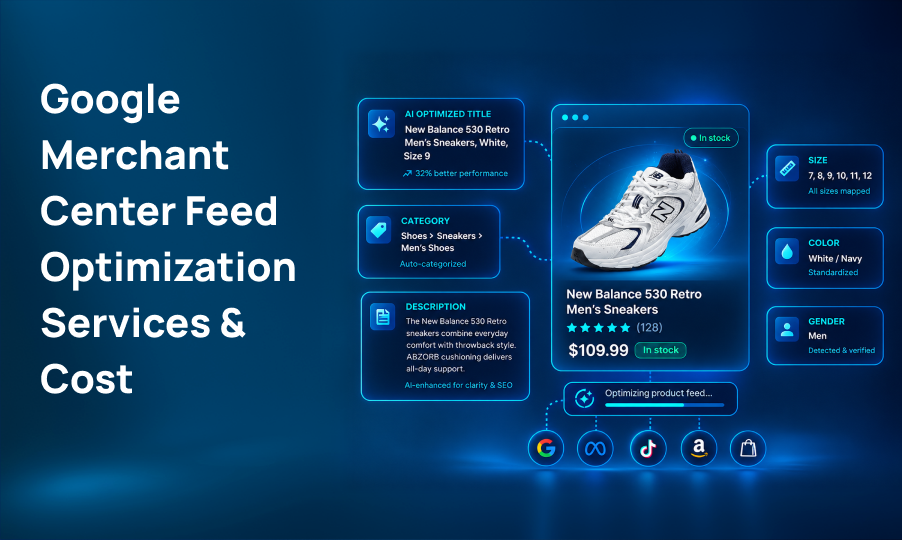
Google Merchant Center feed optimization is the process of improving product data so Google can better understand, categorize, and display products across applicable shopping experiences.
Google Merchant Center Feed Optimization Services & Cost
Listen to this article
Your Google Shopping campaigns can have the right budget, strong products, and good landing pages but if your product feed is incomplete, inaccurate, or poorly structured, performance can suffer.
Your product feed tells Google what you sell.
It includes information such as product titles, descriptions, prices, availability, images, categories, identifiers, and other attributes.
Google uses this information to understand products and determine where they can appear across its shopping experiences.
That makes Google Merchant Center feed optimization an important part of ecommerce marketing.
But what does feed optimization actually include? And how much should businesses expect to pay for it?
This guide breaks down what Google Merchant Center feed optimization services typically cover, what affects the cost, and what to look for when choosing a provider.
Table of Contents
- What Is Google Merchant Center Feed Optimization?
- Why Product Feed Optimization Matters
- What Is Included in Google Merchant Center Feed Optimization Services?
- How Much Does Google Merchant Center Feed Optimization Cost?
- What Affects Feed Optimization Pricing?
- One-Time vs Ongoing Feed Optimization
- How to Choose a Google Merchant Center Optimization Service
- Common Google Merchant Center Feed Optimization Mistakes
- Is Google Merchant Center Feed Optimization Worth It?
- Conclusion
- FAQs
TL;DR
Google Merchant Center feed optimization improves the product data Google uses for Shopping ads and free product listings.
A professional service may include:
- Feed audits
- Product title and description optimization
- Google Product Category mapping
- GTIN, MPN, and brand corrections
- Product attribute optimization
- Image and URL checks
- Price and availability validation
- Disapproval and warning fixes
- Custom labels
- Supplemental feeds
- Feed rules
- Ongoing monitoring and reporting
Pricing depends mainly on catalog size, number of products, feed complexity, channels, and whether you need a one-time audit or ongoing management.
The right service should focus on clean product data, better eligibility, stronger relevance, and measurable business results not simply adding more keywords to your feed.
What Is Google Merchant Center Feed Optimization?
Google Merchant Center feed optimization is the process of improving the product data you send to Google so your products can be better understood, matched to relevant searches, and remain eligible for applicable Shopping experiences.
A basic product feed may contain information such as:
- Product ID
- Title
- Description
- Price
- Availability
- Product URL
- Image URL
- Brand
- GTIN
- MPN
- Product category
- Product type
- Color
- Size
- Material
- Condition
The problem is that simply sending product data to the Merchant Center doesn't mean the feed is fully optimized.
A store might have:
“Running Shoes - Blue”
while a more useful title could communicate the product type, brand, material, model, or other relevant attributes.
The objective isn't to stuff titles with keywords.
It's to provide complete, accurate, relevant product information that helps Google and shoppers understand what you're selling.
Why Product Feed Optimization Matters
Your feed sits between your ecommerce catalog and Google Shopping.
If the information is incomplete or inconsistent, several things can happen.
Products may receive warnings.
Products may become disapproved.
Important attributes may be missing.
Google may have less information to understand the product.
Your listings may be less relevant for valuable searches.
And your Shopping campaigns may have fewer opportunities to show the right products to the right shoppers.
Google recommends maintaining accurate and complete product data, including important attributes, identifiers, categories, prices, availability, and high-quality images.
That is why feed optimization isn't simply a technical cleanup task.
It can be part of a broader Google Shopping and ecommerce growth strategy.
What Is Included in Google Merchant Center Feed Optimization Services?
Not every provider offers the same scope.
A basic feed cleanup may address errors and missing attributes, while a full-service engagement may include ongoing optimization, custom labels, supplemental feeds, and performance analysis.
Here are the most common services.
Feed Audit and Health Check
The first step is usually understanding the current state of the feed.
An audit can identify:
- Disapproved products
- Warnings
- Missing attributes
- Incorrect product categories
- Invalid GTINs
- Missing brand information
- Duplicate or weak product titles
- Price mismatches
- Availability issues
- Image problems
- Landing-page inconsistencies
- Policy-related issues
The goal is to determine which problems have the greatest potential impact.
A good audit should not simply provide a long list of errors.
It should prioritize them.
Product Title Optimization
Product titles are one of the most important pieces of product data.
A weak title might look like:
“Women's Shoes”
A more descriptive title could communicate:
“Women's Waterproof Hiking Shoes - Lightweight Trail Shoes”
The exact structure depends on the product category.
Optimization may consider:
- Brand
- Product type
- Model
- Key features
- Material
- Size
- Color
- Compatibility
- Other important attributes
Google recommends placing important product details toward the beginning of titles because titles can be truncated in some ad formats.
Product Description Optimization
Descriptions provide additional context about the product.
A feed optimization service may review descriptions for:
- Accuracy
- Completeness
- Relevant product details
- Product benefits
- Important attributes
- Consistency with the website
- Readability
The goal isn't to turn a product description into an SEO article.
It should accurately explain the product while supporting Google's understanding of the item.
Google Product Category Optimization
Google Product Category tells Google what type of product you're selling.
Choosing the wrong category can make it harder for Google to correctly understand the product.
For example, a store selling a specialized outdoor product shouldn't simply choose a broad category if a more specific category is available.
Feed optimization services may review category mapping across the catalog and correct products assigned to inappropriate categories.
GTIN, MPN, and Brand Optimization
Product identifiers help Google understand exactly which products you're selling.
Important identifiers can include:
- GTIN
- MPN
- Brand
- Product ID
Incorrect or missing identifiers can create feed issues and affect product eligibility.
Google recommends submitting GTIN values when they are available and using accurate manufacturer part numbers where applicable.
Product Attribute Optimization
Different product categories require different information.
Depending on what you're selling, useful attributes can include:
- Color
- Size
- Material
- Gender
- Age group
- Pattern
- Condition
- Size type
- Product type
- Compatibility
For products with variants, accurate variant information is particularly important.
A feed specialist should identify which attributes matter for each category rather than applying exactly the same rules to every product.
Image and Landing Page Checks
Feed optimization isn't only about text.
Images are an important part of Shopping performance because they are often one of the first things shoppers see.
A service may check:
- Image URLs
- Image quality
- Main product images
- Missing images
- Incorrect images
- Variant-image matching
- Landing-page URLs
- Product-to-page consistency
The product shown in the Shopping listing should match what shoppers find after clicking.
Google specifically recommends matching product information and variants between product data and landing pages.
Price and Availability Optimization
Price and availability need to stay synchronized between your website and Merchant Center.
For example, imagine Google shows:
$49.99-In Stock
but the customer reaches your website and sees:
$59.99-Out of Stock
That creates a poor customer experience and can contribute to feed issues.
Feed management may therefore include monitoring:
- Price
- Sale price
- Availability
- Shipping information
- Product variants
- Website/feed mismatches
Disapproval and Error Fixes
One of the most common reasons businesses seek Merchant Center help is product disapprovals.
Issues may involve:
- Missing information
- Incorrect identifiers
- Policy problems
- Price mismatches
- Availability mismatches
- Invalid categories
- Image issues
- Website-related problems
A professional service should identify the underlying cause rather than repeatedly fixing individual products without addressing the source of the problem.
Custom Labels and Supplemental Feeds
For larger ecommerce catalogs, custom labels can help organize products for campaign management.
For example, products could be segmented by:
- Best sellers
- Profit margin
- Seasonality
- Product type
- Inventory level
- Price range
- Promotional status
Supplemental feeds can also be used to enrich or update product information without rebuilding the primary feed.
These features become especially useful when managing larger catalogs or more advanced Shopping and Performance Max strategies.
Feed Rules and Automation
Manual spreadsheet updates may work for a small catalog.
They become much harder to manage when a business has thousands of products.
Feed optimization services may use rules or feed-management platforms to automate tasks such as:
- Title formatting
- Attribute enrichment
- Product segmentation
- Custom labels
- Data cleanup
- Feed updates
The goal is to create a system that stays optimized as the catalog changes.
Ongoing Monitoring and Reporting
Feed optimization shouldn't necessarily end after the initial cleanup.
Products change.
Prices change.
Inventory changes.
New products are added.
Google's requirements and ecommerce strategies also evolve.
Ongoing management may include:
- Merchant Center diagnostics
- Disapproval monitoring
- Product data updates
- Feed quality checks
- Search performance analysis
- CTR monitoring
- Product-level performance reviews
- Monthly reporting
The best reporting connects feed changes with business outcomes rather than simply showing how many fields were edited.
How Much Does Google Merchant Center Feed Optimization Cost?
There isn't one standard price for Google Merchant Center feed optimization.
The cost depends on the size and complexity of your catalog and the level of service you need.
Current market examples show that ongoing feed optimization can range from several hundred dollars per month to several thousand dollars per month, while larger feed audits, migrations, and rebuilds can cost significantly more.
A useful way to think about pricing is:
Basic Feed Audit
Typical scope:
- Merchant Center health check
- Feed diagnostics
- Disapproval review
- Attribute review
- Prioritized recommendations
This is generally the lowest-cost option because the work is project-based.
Feed Setup or Optimization Project
This may include:
- Feed restructuring
- Title optimization
- Attribute enrichment
- Category mapping
- Identifier corrections
- Feed rules
- Supplemental feeds
- Testing and QA
This costs more because the provider is actually implementing changes.
Ongoing Feed Management
This can include:
- Continuous monitoring
- New product optimization
- Error resolution
- Feed updates
- Performance analysis
- Custom labels
- Reporting
- Ongoing testing
Pricing is often monthly and may increase with catalog size.
For example, one current provider publishes monthly feed-management pricing from $1,000 for up to 500 SKUs to $3,000 for 50,001-100,000 SKUs, while another publishes ongoing optimization starting at 500–3,000/month depending on the engagement.
These numbers should be treated as market examples, not universal rates.
What Affects Feed Optimization Pricing?
Several factors can change the cost.
Catalog Size
Optimizing 100 products is very different from managing 50,000 products.
More products usually mean more rules, more data, more monitoring, and more QA.
Feed Complexity
A simple Shopify catalog may be easier to manage than a custom feed connected to multiple systems.
Number of Variants
Products with many colors, sizes, materials, or other variants can require more detailed feed management.
Number of Countries
International ecommerce can require additional work around:
- Languages
- Currencies
- Shipping
- Taxes
- Product availability
- Country-specific requirements
Number of Sales Channels
Some businesses need feeds for:
- Meta
- Microsoft
- TikTok
- Amazon
- Other shopping platforms
Level of Service
There is a major difference between:
“Give me an audit.”
and
“Manage my feed every month.”
The second requires ongoing specialist time and therefore usually costs more.
One-Time vs Ongoing Feed Optimization
Which one should you choose?
One-Time Optimization Makes Sense If:
- Your feed has never been optimized
- You have a relatively small catalog
- You need an audit before running Shopping campaigns
- You have specific feed problems to fix
- Your internal team can maintain the feed afterward
Ongoing Management Makes More Sense If:
- You have hundreds or thousands of SKUs
- Products change frequently
- Inventory changes regularly
- You run Performance Max campaigns
- You frequently add new products
- You don't have an internal feed specialist
- Feed errors keep returning
For large catalogs, ongoing monitoring can help prevent a feed from becoming outdated after the initial optimization.
How to Choose a Google Merchant Center Optimization Service
Don't choose a provider based only on price.
Ask these questions first.
Do They Actually Work Inside a Merchant Center?
A provider should understand Merchant Center diagnostics, product data, feed structure, disapprovals, and account-level issues.
Do They Optimize the Feed or Just Fix Errors?
Error fixing is important.
But true optimization should also look at:
- Titles
- Descriptions
- Categories
- Attributes
- Product identifiers
- Custom labels
- Product segmentation
- Performance data
Can They Handle Your Catalog Size?
Ask how they manage large catalogs.
A strategy that works for 100 products may not work for 20,000.
Do They Understand Google Shopping and Performance Max?
Feed optimization becomes more valuable when the provider understands how product data connects with Shopping campaigns and Performance Max.
Do They Provide Reporting?
Ask to see a sample report.
You should be able to understand:
- What was wrong
- What was changed
- Which products were affected
- What improved
- What still needs attention
- What happens next
Do They Have a Clear Pricing Model?
Avoid choosing a provider simply because the initial price looks cheap.
Compare:
Scope + catalog size + implementation + monitoring + reporting
rather than comparing monthly prices alone.
Common Google Merchant Center Feed Optimization Mistakes
Using Generic Product Titles
Titles that don't clearly describe the product can limit relevance.
Missing Product Attributes
Leaving important attributes blank gives Google less information about the product.
Incorrect Google Product Categories
Broad or incorrect categories can reduce product relevance.
Incorrect GTINs
Never guess product identifiers.
Use accurate information from the manufacturer or product data.
Price and Availability Mismatches
Your website and Merchant Center should reflect the same product information.
Ignoring Disapprovals
A product that isn't eligible can't generate Shopping visibility.
Optimizing Once and Forgetting About the Feed
Your catalog changes over time.
Your feed should change with it.
Treating Every Product the Same
Different products may need different titles, attributes, categories, and segmentation strategies.
Is Google Merchant Center Feed Optimization Worth It?
For ecommerce businesses that rely heavily on Google Shopping, it can be a valuable investment.
The key is understanding what you're actually paying for.
You're not simply paying someone to change product titles.
You're paying for better product data management.
That can help create:
Cleaner data → Better product understanding → Stronger eligibility → More relevant Shopping opportunities → Better campaign performance
But feed optimization alone doesn't guarantee higher sales.
Performance also depends on factors such as:
- Product demand
- Pricing
- Competition
- Website experience
- Conversion rate
- Advertising strategy
- Product quality
- Offers
- Customer experience
A strong feed gives Google better information to work with. It doesn't replace the rest of your ecommerce strategy.
Conclusion
Google Merchant Center feed optimization is more than fixing a few product errors.
A strong optimization strategy looks at the entire product data ecosystem—from titles and categories to identifiers, attributes, images, prices, availability, and landing pages.
For smaller stores, a one-time audit may be enough to establish a cleaner foundation.
For larger catalogs, ongoing feed management can make more sense because products, inventory, pricing, and campaigns continue to change.
When comparing Google Merchant Center feed optimization services, don't simply ask:
“How much does it cost?”
Ask:
“What exactly will be optimized, how many products will be managed, and how will success be measured?”
That will give you a much clearer picture of whether the service is worth the investment.
Ready to take the next step?
Frequently Asked Questions
Services may include feed audits, title and description optimization, category mapping, GTIN and MPN corrections, attribute optimization, disapproval fixes, custom labels, supplemental feeds, and ongoing monitoring.
Pricing varies based on catalog size, feed complexity, number of products, channels, and level of service. Some providers charge a one-time project fee, while ongoing management is commonly priced monthly.
A feed audit can range from a few hundred dollars to several thousand dollars depending on catalog size, account complexity, and the depth of analysis required.
Not exactly. Feed optimization focuses primarily on product data, while broader Google Shopping optimization can also include campaign structure, bidding, audience strategy, conversion tracking, and budget management.
It can help identify and resolve many feed-related disapprovals, but some issues may involve website policies, business information, landing pages, or other Merchant Center requirements.
There isn't one fixed schedule. Ongoing monitoring is useful for stores with frequently changing products, prices, inventory, or large catalogs. Smaller stores may need less frequent optimization.