Intelligent document processing for legal firms uses AI and related technologies to capture, classify, extract, validate, and organize information from legal documents.
How AI Is Making Legal Document Processing Faster and Smarter
Listen to this article
Legal firms handle enormous volumes of documents every day. Contracts, case files, court documents, legal briefs, discovery records, invoices, and client documents all require careful review and organization. Managing this information manually can take significant time and make it difficult for legal professionals to quickly find the information they need.
Intelligent document processing for legal firms uses artificial intelligence to help automate how legal documents are captured, classified, understood, and processed. Instead of relying entirely on manual data entry and document review, legal teams can use AI to extract relevant information and move documents through predefined workflows.
For law firms looking to improve efficiency while handling growing document volumes, Intelligent document processing can become an important part of modern legal operations.
Table of Contents
- What Is Intelligent Document Processing for Legal Firms?
- Why Legal Firms Need Document Processing Automation
- How Intelligent Document Processing Works
- Types of Legal Documents AI Can Process
- Benefits of Intelligent Document Processing for Legal Firms
- Common Use Cases of Intelligent Document Processing in Legal Firms
- IDP vs. Traditional OCR for Legal Documents
- How AI Improves Legal Workflows
- Challenges of Implementing IDP in Legal Firms
- The Future of AI-Powered Legal Document Processing
- Conclusion
What Is Intelligent Document Processing for Legal Firms?
Intelligent document processing (IDP) is a technology that uses AI, machine learning, optical character recognition, and natural language processing to extract and understand information from documents.
For legal firms, Intelligent document processing for law firms can help turn large amounts of unstructured legal information into organized and usable data.
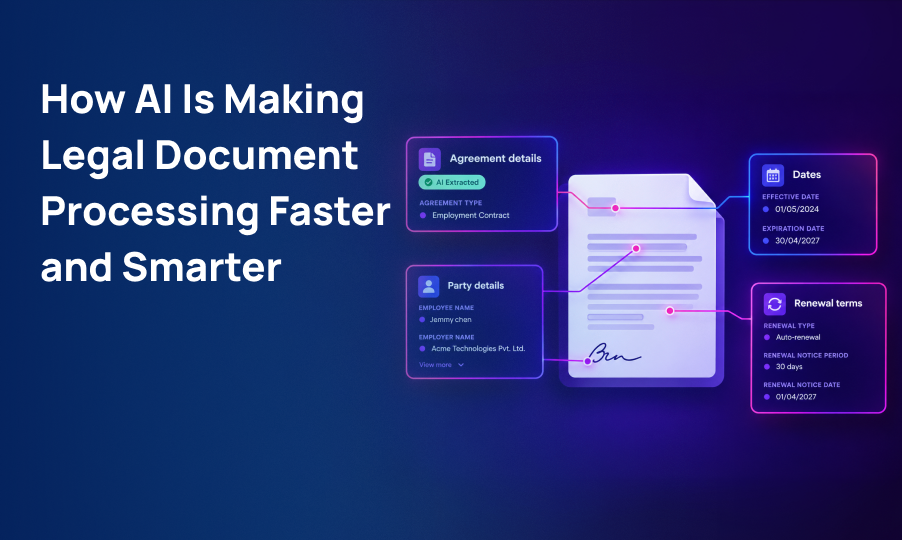
For example, when a law firm receives a contract, an IDP system can identify the document type and extract important information such as:
- Parties involved
- Contract dates
- Payment terms
- Renewal dates
- Key obligations
- Important clauses
- Case or matter references
The extracted information can then be sent to the appropriate system or workflow.
This allows legal professionals to spend less time performing repetitive document-related tasks and more time on work that requires legal expertise.
Why Legal Firms Need Document Processing Automation
Legal work is heavily dependent on documents. Attorneys and legal support teams may need to review hundreds or thousands of pages during a case or transaction.
Manual processing can create several challenges:
- Time-consuming data entry
- Difficulty finding specific information
- Repetitive document review
- Risk of human error
- Slow document classification
- Delays in legal workflows
- Difficulty managing large document volumes
Legal document automation can help reduce these challenges by automating repetitive document-processing activities.
Instead of manually searching through every document, teams can use AI-powered systems to identify, extract, and organize relevant information.
How Intelligent Document Processing Works
IDP typically involves several stages that work together to transform documents into structured information.
1. Document Capture
Documents can enter a legal firm's workflow through email, document uploads, scanning systems, digital forms, or connected applications.
The system collects the documents and prepares them for processing.
2. Document Classification
AI identifies the type of document being processed.
For example, a system may distinguish between:
- Contracts
- Court filings
- Legal briefs
- Invoices
- Evidence documents
- Client forms
- Correspondence
- Case records
Classification helps ensure that each document follows the correct workflow.
3. Data Extraction
AI extracts important information from the document. Depending on the document type, this could include names, dates, case numbers, clauses, amounts, deadlines, and other relevant information.
This AI document extraction process reduces the need for legal teams to manually copy information from documents.
4. Information Validation
Extracted information can be checked against predefined rules or existing records. If the system identifies missing or unusual information, it can flag the document for human review.
5. Workflow Routing
After processing, documents can automatically move to the appropriate person, department, or application.
For example:
Document received → Classified → Information extracted → Validated → Reviewed → Stored
This helps create a more consistent and efficient legal workflow.
6. Document Storage
Processed documents and extracted information can be stored in centralized systems, making it easier for authorized users to locate and access records.
Types of Legal Documents AI Can Process
AI document processing for legal firms can be applied to many types of documents.
Contracts and Agreements
AI can identify important contract information, including dates, parties, obligations, payment terms, and renewal conditions.
Court Documents
Legal teams can use document processing to classify and organize court filings, case records, and related documents.
Legal Briefs
AI can help extract and organize information from lengthy legal briefs, making large volumes of text easier to process.
Discovery Documents
During discovery, legal teams may need to review significant amounts of information. AI can help classify documents and identify relevant information for further review.
Client Documents
Forms, applications, correspondence, and other client-related documents can be automatically categorized and processed.
Legal Invoices
AI can extract information from invoices and help route them through billing and approval workflows.
Benefits of Intelligent Document Processing for Legal Firms
Reduces Manual Work
One of the biggest benefits of IDP is the ability to automate repetitive document-processing activities. Legal professionals can spend less time manually entering information and organizing files.
Saves Time
AI can process large volumes of documents much faster than manual workflows, helping legal teams access relevant information more quickly.
Improves Data Accuracy
Manual data entry can lead to missing or incorrect information. Automated extraction and validation can help reduce these errors.
Makes Information Easier to Find
When document information is classified and structured, legal teams can search and retrieve relevant records more efficiently.
Supports Large Document Volumes
Law firms handling complex cases may need to process thousands of documents. Automation can help teams manage these volumes more efficiently.
Improves Workflow Efficiency
Documents can automatically move between processing, review, approval, and storage stages, reducing unnecessary delays.
Allows Legal Professionals to Focus on Higher-Value Work
By reducing repetitive administrative tasks, IDP allows attorneys and legal teams to spend more time on research, strategy, client communication, and other activities requiring professional judgment.
Common Use Cases of Intelligent Document Processing in Legal Firms
Contract Review and Data Extraction
AI can extract important information from contracts and organize it for further review. Legal teams can quickly identify dates, parties, clauses, obligations, and other relevant details.
Legal Discovery
Discovery can involve large volumes of documents. AI can help classify and organize information, making it easier for legal teams to identify relevant records.
Case File Management
Documents related to a particular case can be classified and organized automatically, improving access to case information.
Compliance Documentation
Legal and compliance teams can use automation to process and organize regulatory and compliance-related documents.
Legal Billing
Invoice information can be extracted and routed through billing workflows, reducing manual processing.
Client Onboarding
Client forms and supporting documents can be automatically captured, classified, and routed to the appropriate teams.
IDP vs. Traditional OCR for Legal Documents
Traditional OCR, or Optical Character Recognition, is mainly designed to convert text from scanned documents or images into digital text.
While OCR is useful for digitizing documents, it does not necessarily understand the meaning or context of the information.
Intelligent document processing combines OCR with AI technologies to understand document structure and extract specific information.
| Traditional OCR | Intelligent Document Processing |
|---|---|
| Converts images into text | Understands document content and context |
| Primarily focuses on text recognition | Extracts meaningful information |
| Limited understanding of document structure | Can classify different document types |
| Often requires manual review | Can support automated validation |
| Limited workflow capabilities | Can connect with automated workflows |
For legal firms handling different types of documents, IDP can provide a more intelligent approach to document processing.
How AI Improves Legal Workflows
The real value of intelligent document processing comes when it is connected to broader legal workflows.
For example, a contract received by a law firm could automatically be:
Captured → Classified → Analyzed → Key information extracted → Reviewed → Stored
Similarly, client documents could be automatically classified and connected to the appropriate case or matter.
This creates legal workflow automation, where information can move between different stages without requiring employees to manually manage every step.
Businesses can combine Document Intelligence and AI + Automation with their existing workflows to build more connected document-processing systems.
Challenges of Implementing IDP in Legal Firms
Although IDP can provide significant benefits, legal firms should consider several factors when implementing the technology.
Data Security
Legal documents can contain highly sensitive client, financial, and case information.
Organizations need appropriate security controls, access permissions, and data protection practices when implementing document-processing systems.
Legal firms can also strengthen their broader technology environment through Cybersecurity solutions.
Document Complexity
Legal documents can vary significantly in structure, language, formatting, and complexity.
An effective IDP solution should be capable of handling different document types and identifying exceptions that require human review.
System Integration
IDP solutions may need to work alongside document management systems, case management platforms, accounting software, and other business applications.
Integration is important for creating an end-to-end workflow rather than an isolated automation tool.
Human Oversight
AI should support legal professionals rather than replace legal judgment.
Complex cases, unusual documents, and important legal decisions may still require review by qualified professionals.
The Future of AI-Powered Legal Document Processing
The future of legal document processing is moving beyond simple digitization.
AI systems are increasingly being used to understand documents, identify patterns, extract information, and support automated workflows.
Future applications may allow legal professionals to ask AI systems questions about large collections of documents, summarize contracts, identify important clauses, locate relevant case information, and surface potential issues for review.
The combination of Intelligent document processing, AI, and workflow automation can help legal firms build more efficient and scalable operations.
Rather than simply storing digital documents, firms can turn their document repositories into useful sources of structured information.
Conclusion
Intelligent document processing for legal firms can help law firms reduce repetitive document work, improve information accessibility, increase processing efficiency, and manage growing document volumes.
By combining AI document extraction, classification, validation, and workflow automation, legal organizations can transform unstructured documents into structured and usable information.
The goal is not to replace legal professionals. Instead, IDP can handle repetitive document-related tasks while attorneys and legal teams focus on research, strategy, client service, and decisions that require human expertise.
As legal operations continue to become more digital, Intelligent document processing can play an important role in building faster, more organized, and scalable legal workflows.
Ready to take the next step?
Frequently Asked Questions
AI can process contracts, court documents, legal briefs, discovery records, client forms, invoices, compliance documents, and other legal records.
IDP can reduce manual data entry, speed up document processing, improve information accessibility, reduce repetitive work, and support automated legal workflows.
OCR primarily converts text from scanned documents into digital text. IDP goes further by using AI to classify documents, understand context, extract relevant information, and support automated workflows.
Yes. AI can extract information such as parties, dates, obligations, payment terms, renewal periods, and other relevant contract details for further review.
IDP can be implemented with appropriate security controls, access permissions, encryption, and data protection practices. Legal firms should evaluate the security capabilities of any solution before implementation.
No. IDP is designed to automate repetitive document-processing tasks and support legal professionals. Human expertise remains important for legal analysis, judgment, strategy, and decision-making.