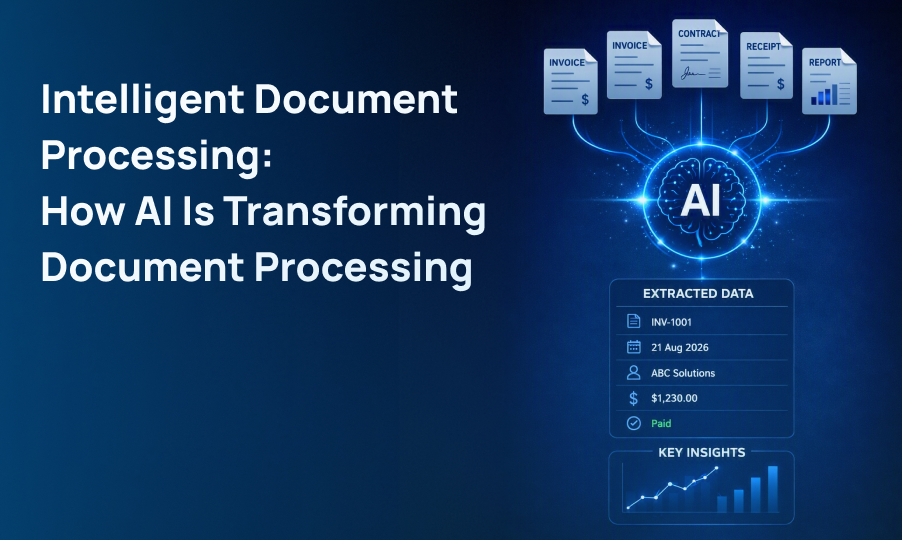
Intelligent Document Processing is an AI -powered technology that automatically captures, extracts, classifies, understands, validates, and processes information from documents.
Intelligent Document Processing: How AI Is Transforming Document Processing
Listen to this article
Businesses handle large volumes of documents every day, including invoices, contracts, applications, receipts, reports, and financial records. Processing this information manually can be time-consuming, repetitive, and prone to errors.
Intelligent Document Processing (IDP) helps businesses automate these tasks by combining artificial intelligence, OCR, machine learning, natural language processing, and automation.
Unlike traditional document processing, IDP can understand document content, extract important information, and move that information into business workflows.
Table of Contents
- What Is Intelligent Document Processing?
- How Does Intelligent Document Processing Work?
- Key Capabilities of Intelligent Document Processing
- Intelligent Document Processing vs. Traditional OCR
- Benefits of AI Document Processing
- Intelligent Document Processing Use Cases
- How Document Processing Automation Works
- Technologies Behind Intelligent Document Processing
- Challenges to Consider
- The Future of Intelligent Document Processing
- Conclusion
What Is Intelligent Document Processing?
Intelligent Document Processing is an AI-powered approach that allows businesses to capture, classify, extract, understand, and process information from different types of documents.
For example, an AI-powered document processing system can analyze an invoice and identify:
- Vendor name
- Invoice number
- Invoice date
- Line items
- Tax amount
- Total amount
- Payment information
The extracted information can then be validated and transferred to accounting, ERP, CRM, or other business systems.
This makes intelligent document processing services useful for organizations that manage large volumes of documents every day.
How Does Intelligent Document Processing Work?
An intelligent document processing workflow generally follows:
Capture → Extract → Classify → Understand → Validate → Automate
Document Capture
Documents can enter the system through email, scanners, cloud storage, websites, or existing business applications
Document Data Extraction
OCR and AI extract text, fields, tables, and other relevant information. Document data extraction helps convert unstructured information into structured and usable business data.
Document Classification
AI can identify whether a document is an invoice, contract, receipt, application, purchase order, or financial record.
Information Understanding
Instead of simply reading words, AI analyzes the context, structure, fields, tables, and relationships within a document.
Validation and Automation
The extracted information can be checked against business rules or databases before being transferred to other systems.
This process enables automated document processing while reducing the amount of manual data entry required.
Key Capabilities of Intelligent Document Processing
Modern intelligent document processing solutions can support several document-related tasks.
- Document classification and extraction
- Invoice processing
- Customer request routing
- IT ticket classification
- Data validation
- Report generation
- Employee onboarding workflows
- Incident triage
Automated Data Extraction
AI can extract information from structured, semi-structured, and unstructured documents.
Document Classification
Documents can be automatically categorized and routed to the appropriate department or workflow.
OCR and Text Recognition
OCR converts scanned documents and images into machine-readable information.
Document Understanding
AI can understand document context, layouts, fields, tables, and relationships between information.
Data Validation
The system can identify missing information, inconsistencies, and potential errors before data enters downstream systems.
Document Summarization
Generative AI can summarize lengthy documents and highlight important information, helping employees review documents faster.
Workflow Automation
Extracted information can trigger automated business workflows and reduce repetitive administrative tasks.
Businesses can combine these capabilities with AI + Automation to create more intelligent document workflows.
Intelligent Document Processing vs. Traditional OCR
Traditional OCR and Intelligent Document Processing are related, but they are not the same.
| Traditional OCR | Intelligent Document Processing |
|---|---|
| Mainly extracts text | Extracts and understands information |
| Limited context | Understands document context |
| Primarily text-focused | Handles fields, tables, and layouts |
| Requires additional processing | Supports workflow automation |
| Basic digitization | Intelligent document automation |
Traditional OCR can be useful for basic text conversion. However, businesses with complex document workflows can benefit from a complete IDP solution.
Benefits of AI Document Processing
Implementing AI document processing can provide several benefits for businesses.
Reduce Manual Work
Employees spend less time copying information from documents into spreadsheets and business applications.
Improve Processing Speed
AI can process large volumes of documents faster than traditional manual workflows.
Improve Data Accuracy
Automated extraction and validation can help reduce common data-entry mistakes.
Lower Operational Costs
Automating repetitive tasks allows employees to focus on higher-value business activities.
Improve Information Accessibility
Extracted information can be organized and indexed, making it easier to search and retrieve.
Scale Document Processing
Businesses can handle increasing document volumes without proportionally increasing manual resources.
Intelligent Document Processing Use Cases
Intelligent document processing services can be used across many industries.
Banking and Financial Services
Financial institutions can process loan applications, bank statements, invoices, financial records, and other documents.
Insurance
Insurance companies can automate claims, policy documents, applications, and supporting records.
Healthcare
Healthcare organizations can process forms, reports, administrative documents, and other records.
Legal
Law firms can process contracts, agreements, case files, and legal records more efficiently.
Accounting
Accounting teams can automate invoice, receipt, expense, and financial document processing.
Logistics and Supply Chain
Seamlessly process purchase orders, shipping documents, delivery records, and invoices. Learn how AI document processing in supply chain automates operations to reduce manual errors and speed up fulfillment.
Human Resources
HR teams can streamline resumes, applications, employee forms, and other document-heavy HR workflows with Intelligent Document Processing (IDP).
How Document Processing Automation Works
Document processing automation combines AI-based extraction with business workflows.
For example, when an invoice arrives through email, an automated system can:
- Capture the invoice.
- Identify the document type.
- Extract vendor and payment information.
- Validate the extracted data.
- Match it with purchase-order information.
- Send it for approval.
- Store the processed information.
This reduces manual intervention while still allowing employees to review important information when required.
Businesses can also connect these workflows with data and analytics platforms to make processed information more accessible and useful for reporting and decision-making.
Technologies Behind Intelligent Document Processing
An effective IDP solution can combine several technologies, including:
- Artificial Intelligence for intelligent processing
- OCR for text extraction
- Machine Learning for classification and pattern recognition
- Natural Language Processing for understanding text
- Computer Vision for document layouts and visual information
- Generative AI for summarization and advanced analysis
- Large Language Models for contextual understanding
- APIs for system integration
- workflows automation for business process execution
Together, these technologies allow businesses to move beyond simple document data extraction toward intelligent document understanding.
Challenges to Consider
Businesses should also consider several challenges when implementing intelligent document processing solutions.
Poor-Quality Documents
Low-resolution scans, damaged files, and unclear images can affect extraction accuracy.
Complex Document Layouts
Tables, forms, multi-column documents, and unusual layouts can make processing more difficult.
Handwritten Information
Handwritten content may require additional processing and human validation.
Data Privacy and Security
Business documents may contain confidential information. Organizations should implement appropriate access controls, security measures, and data governance. Cybersecurity should be considered as part of the overall document processing strategy.
Human Validation
Some documents may still require human review when information is unclear or a workflows involves important business decisions.
System Integration
Connecting an IDP platform with existing ERP, CRM, accounting, or workflows systems may require additional integration work.
The Future of Intelligent Document Processing
The future of intelligent document processing is moving beyond basic OCR and data extraction toward deeper document understanding.
Generative AI and AI agents can help systems analyze complex documents, summarize information, identify important details, and take actions based on extracted data.
For example, an AI agent could read an invoice, extract the relevant information, validate it against business rules, and initiate approval workflows automatically.
This can turn documents from static information sources into inputs for intelligent and automated business processes.
Conclusion
Intelligent Document Processing is changing how businesses handle large volumes of information. By combining AI , OCR, machine learning, natural language processing, and automation, organizations can reduce manual work and improve document processing efficiency.
From banking and insurance to healthcare, legal, accounting, logistics, and HR, intelligent document processing solutions can help businesses turn unstructured and semi-structured information into structured, actionable data.
As AI continues to advance, automated document processing will increasingly move from simple text extraction toward intelligent understanding, workflow automation, and faster business decision-making.
Ready to take the next step?
Frequently Asked Questions
OCR mainly extracts text from scanned documents, while IDP uses AI to understand document structure, context, fields, tables, and relationships.
AI document processing uses artificial intelligence to automatically extract, understand, classify, and process information from documents.
Intelligent document processing services help businesses automate document capture, document data extraction, classification, validation, and workflow processing.
Banking, insurance, healthcare, legal, accounting, logistics, HR, and other document-heavy industries can benefit from IDP.
Document processing automation can reduce manual data entry, improve processing speed, minimize errors, lower operational effort, and help businesses process larger document volumes efficiently.