A network security firewall is a hardware device, software program, or cloud service that monitors and controls incoming and outgoing network traffic based on security rules.
Network Security Firewall: How Businesses Can Protect Their Networks
Listen to this article
Table of Contents
- Introduction
- What Is a Network Security Firewall?
- Why Businesses Need a Network Security Firewall
- Types of Network Firewalls
- Common Business Network Security Problems and Solutions
- Role of Firewalls in Modern Business Security
- Key Benefits of Network Security Firewalls
- Challenges of Implementing Firewall Security
- How to Implement Network Security Firewall Solutions
- Market Impact and Future of Network Firewall Security
- Network Security Firewall Solutions with Wisdom Square Technologies
- Conclusion
- Frequently Asked Questions (FAQs)
Introduction
Businesses depend on networks to connect employees, applications, servers, and customer data. Without proper protection, these networks can become targets for hackers, malware, and unauthorized access.
A network security firewall helps protect business networks by monitoring incoming and outgoing traffic and blocking suspicious connections. It gives businesses better control over network access and helps reduce cybersecurity risks.
What Is a Network Security Firewall?
A network security firewall is a hardware device, software program, or cloud-based service that monitors and filters network traffic based on predefined security rules.
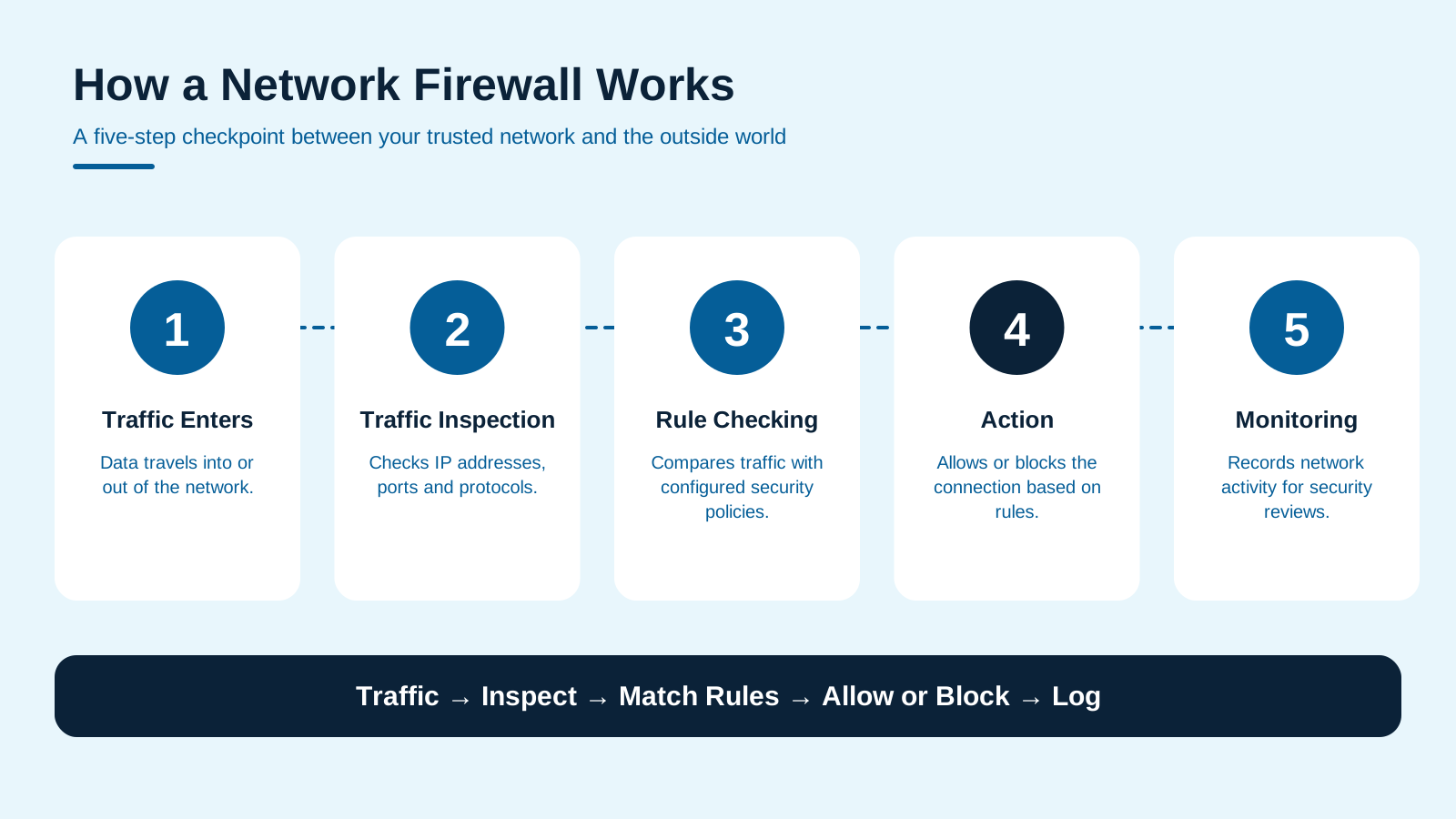
It works like a security checkpoint between a trusted business network and external networks.
How Does a Network Firewall Work?
- Traffic enters: Data travels into or out of the network.
- Traffic inspection: The firewall checks details such as IP addresses, ports, and protocols.
- Rule checking: It compares traffic with configured security policies.
- Action: It allows or blocks connections based on the rules.
- Monitoring: It records network activity for security reviews.
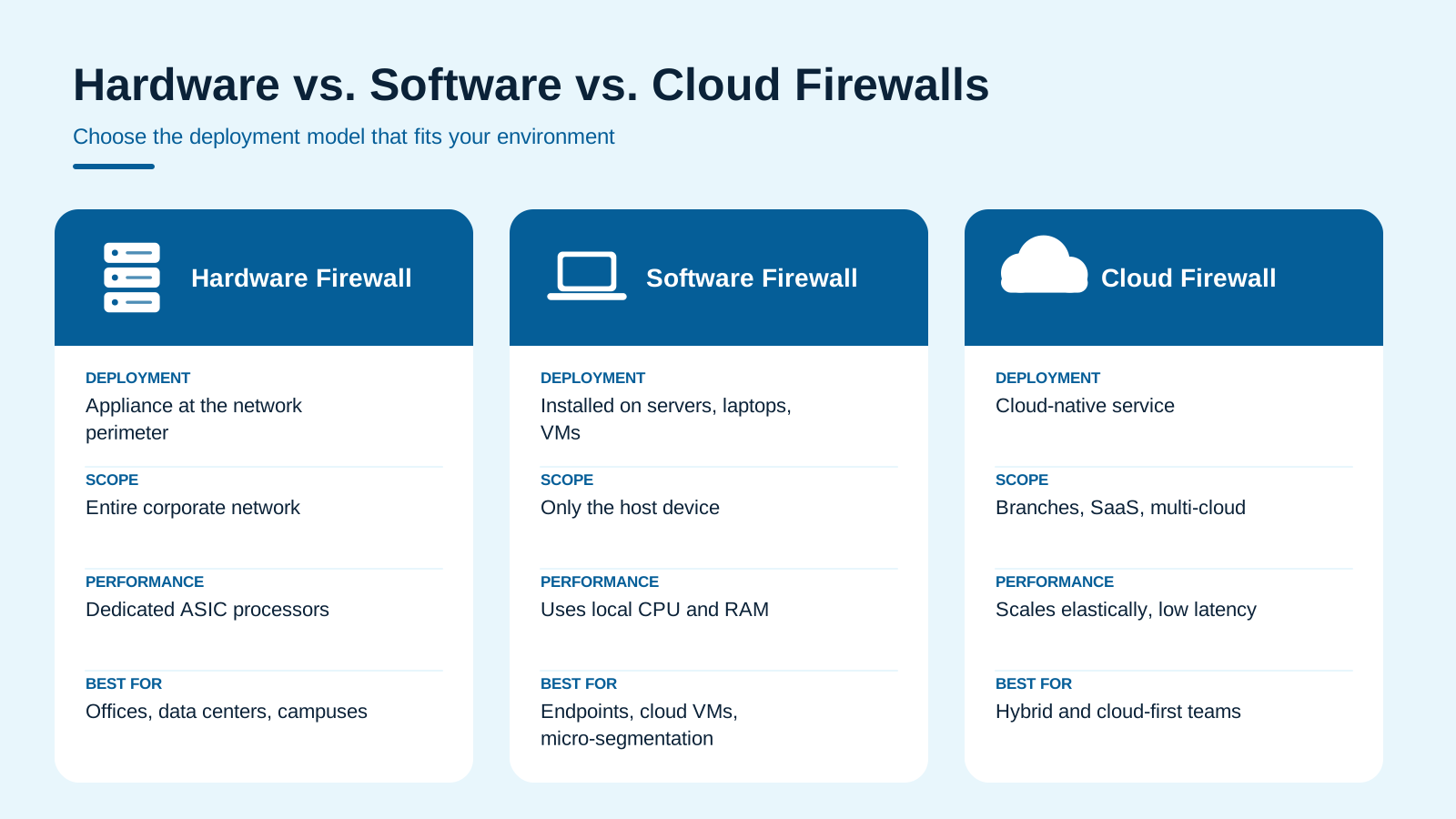
Hardware vs. Software Firewall
- Hardware firewall: A physical device that protects an entire business network.
- Software firewall: A program installed on individual computers or servers to control their network connections.
Businesses can use both for better protection.
Hardware vs. Software vs. Cloud Firewalls
Why Businesses Need a Network Security Firewall
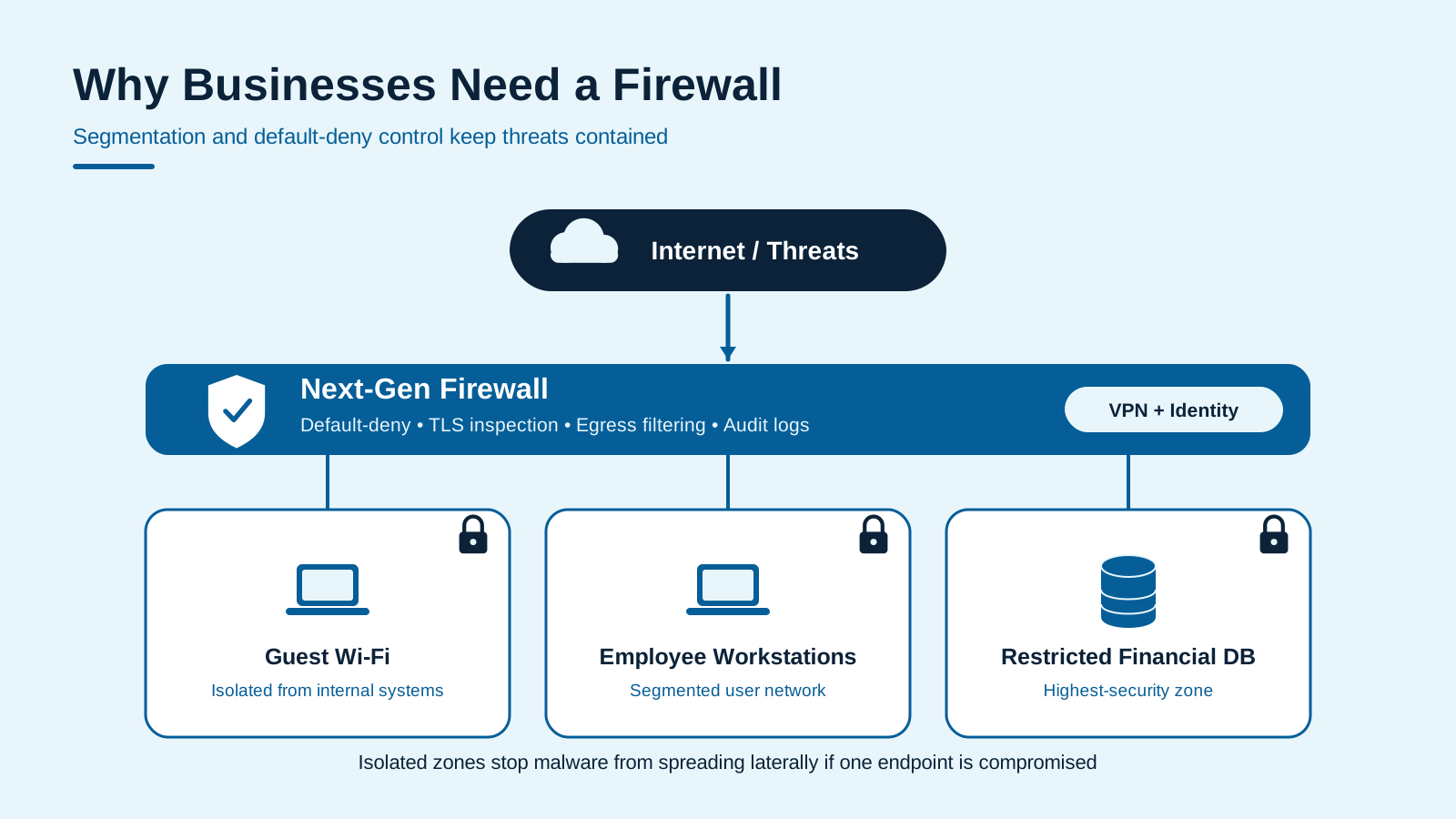
A network firewall serves as the primary perimeter and internal boundary control for corporate IT infrastructure. Rather than simply blocking external threats, modern enterprise firewalls enforce granular security policies across hybrid networks:
- Default-Deny Access Control: Following NIST SP 800-41 guidelines, firewalls operate on a "default-deny" posture blocking all unsolicited inbound traffic by default and permitting only explicitly authorized IP addresses, ports, and protocols.
- Network Segmentation & Lateral Movement Prevention: By dividing a corporate network into isolated zones (such as separating guest Wi-Fi, employee workstations, and restricted financial databases), a firewall prevents malware from spreading laterally if one endpoint is compromised.
- Encrypted Traffic (SSL/TLS) Inspection: Since the vast majority of modern web traffic is encrypted, advanced firewalls decrypt, inspect, and re-encrypt HTTPS packets to catch hidden malware and command-and-control traffic before it reaches internal servers.
- Outbound Data Loss Prevention: Beyond filtering incoming requests, egress filtering rules stop unauthorized outbound connections preventing compromised devices from exfiltrating sensitive customer records or intellectual property to external servers.
- Secure Remote & Hybrid Connectivity: Firewalls act as secure VPN termination points and integrate with identity providers to authenticate remote employees before granting access to internal cloud or on-premises applications.
- Centralized Audit Logs & Compliance: Continuous packet logging creates an audit trail required for regulatory frameworks like ISO 27001, SOC 2, and PCI-DSS, helping security teams investigate anomalies quickly.
Types of Network Firewalls
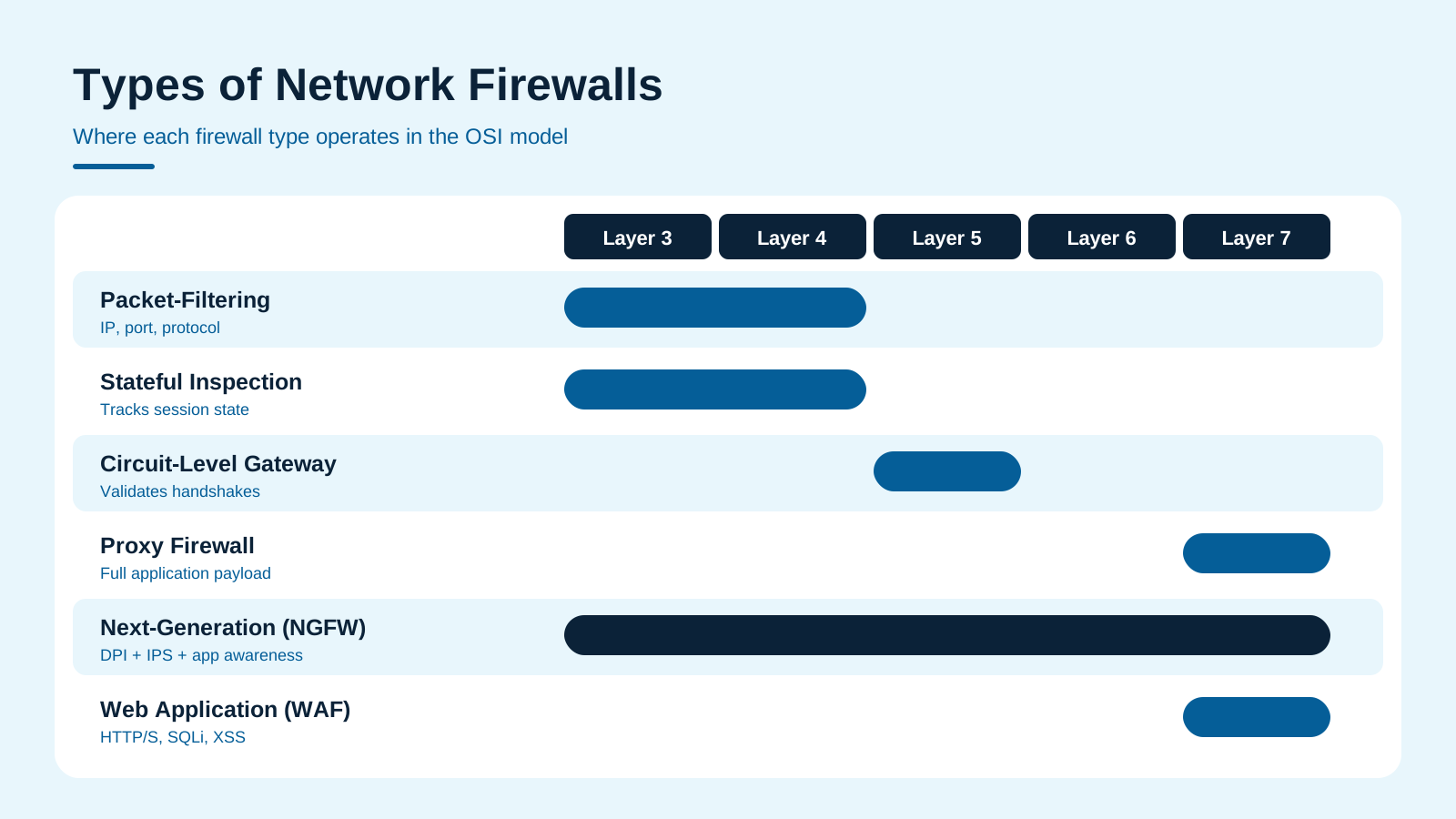
Different firewall types provide different levels of network protection.
1. Packet-Filtering Firewall
Checks basic packet details such as IP addresses, ports, and protocols before allowing or blocking traffic.
Business use: Blocking unnecessary network ports and unapproved connections.
2. Stateful Inspection Firewall
Tracks active connections and checks whether network traffic belongs to a legitimate session.
Business use: Allowing valid employee connections while blocking unexpected traffic.
3. Proxy Firewall
Acts as an intermediary between users and external servers, inspecting requests before forwarding them.
Business use: Controlling employee access to external websites.
4. Circuit-Level Gateway
Checks whether network connections and sessions are legitimate without deeply inspecting application data.
Business use: Controlling connections between internal and external networks.
5. Next-Generation Firewall (NGFW)
Combines traditional firewall protection with advanced features such as application inspection, intrusion prevention, and threat detection.
Business use: Protecting enterprise networks and monitoring application traffic.
6. Web Application Firewall (WAF)
Protects websites and web applications by filtering HTTP and HTTPS requests. It helps block attacks such as SQL injection and cross-site scripting.
Business use: Protecting e-commerce websites, customer portals, and online applications.
A WAF provides specialized web application protection and complements a network firewall.
7. Cloud-Based Firewall
Provides firewall protection through cloud-based services instead of relying only on physical devices.
Business use: Protecting cloud applications, remote employees, and distributed business networks.
Quick Comparison: Network Firewall Types
| Firewall Type | OSI Layer | Inspection Capability | Primary Business Use Case |
|---|---|---|---|
| Packet-Filtering (Stateless) | Layer 3–4 | Evaluates source/destination IP, port, and protocol independently without session memory. | Basic perimeter filtering on internal routers and high-speed switching. |
| Stateful Inspection | Layer 3–4 | Tracks active TCP/UDP connection states and verifies whether packets belong to a legitimate session. | Standard gateway security to allow valid outbound sessions while blocking unsolicited inbound probes. |
| Circuit-Level Gateway | Layer 5 | Validates TCP handshakes and session legitimacy without inspecting packet payloads. | Lightweight session verification between internal and external networks. |
| Proxy Firewall | Layer 7 | Acts as an intermediary, terminating client connections and inspecting full application payloads. | Filtering employee web browsing and masking internal network IP addresses. |
| Next-Generation Firewall (NGFW) | Layer 3–7 | Combines stateful inspection with Deep Packet Inspection (DPI), Intrusion Prevention (IPS), and application awareness. | Comprehensive enterprise perimeter defense against modern malware and application-layer exploits. |
| Web Application Firewall (WAF) | Layer 7 | Inspects HTTP/HTTPS traffic to block OWASP Top 10 threats like SQL injection and Cross-Site Scripting (XSS). | Protecting customer-facing websites, APIs, and e-commerce portals. |
Common Business Network Security Problems and Solutions
Businesses face several network security risks. Firewalls help reduce these risks through traffic filtering and access control.
Unauthorized Access
Hackers or unapproved users may try to access internal systems.
Solution: Firewall rules restrict connections to approved users, devices, and network addresses.
Malware and Suspicious Traffic
Malicious traffic can enter through unsafe connections or compromised devices.
Solution: Advanced firewalls can identify and block certain suspicious traffic using threat intelligence and intrusion prevention.
Data Exposure
Unrestricted network connections may allow sensitive information to leave the business network.
Solution: Outbound traffic rules help restrict communication with unapproved destinations.
Insecure Remote Access
Remote employees may connect to company systems using different networks and devices.
Solution: Firewalls can work with VPNs and access controls to secure remote connections.
Network Vulnerabilities
Unnecessary open ports and outdated systems can create security weaknesses.
Solution: Firewalls help reduce network exposure, while regular updates and vulnerability assessments address underlying weaknesses.
Role of Firewalls in Modern Business Security
Modern businesses use cloud platforms, remote access, and connected applications. Firewalls help manage security across these environments.
Network Monitoring
Firewalls monitor network connections and record activity to help IT teams identify unusual traffic.
Access Control and Segmentation
Businesses can restrict access to sensitive systems and separate departments into different network segments.
Remote Workforce Protection
Firewall and VPN capabilities help employees securely connect to business applications from different locations.
Cloud Security
Cloud-based firewalls help control traffic between cloud applications, servers, and external networks.
Integration with Security Tools
Advanced firewalls can work with antivirus software, intrusion prevention systems, endpoint security, and SIEM platforms.
Key Benefits of Network Security Firewalls
Network firewall security offers several benefits to businesses.
Improved Network Protection
Firewalls help block unauthorized access and suspicious traffic before it reaches protected systems.
Better Traffic Control
Businesses can manage which applications, users, and services can communicate across their networks.
Reduced Security Risks
Restricting unnecessary network access helps reduce the number of potential entry points for attackers.
Greater Network Visibility
Firewall logs and monitoring features help IT teams understand network activity and investigate unusual connections.
Secure Business Connectivity
Firewalls help protect communication between offices, employees, cloud platforms, and business applications.
Simplified Security Management
Centralized firewall policies make it easier for IT teams to manage security across multiple locations.
Challenges of Implementing Firewall Security
Firewall implementation requires proper planning and ongoing management.
Implementation Costs
Hardware, software licenses, cloud subscriptions, and maintenance can increase security expenses.
Complex Configuration
Incorrect firewall rules may create security gaps or block important business applications.
False Positives
Firewalls may sometimes block legitimate traffic, affecting normal business operations.
Performance Issues
Advanced traffic inspection can affect network speed if the firewall is not configured correctly.
Regular Maintenance
Firewall rules, software, and security policies need regular updates.
Skilled Staff Requirements
Businesses need trained IT professionals to configure, monitor, and manage firewall systems.
How to Implement Network Security Firewall Solutions
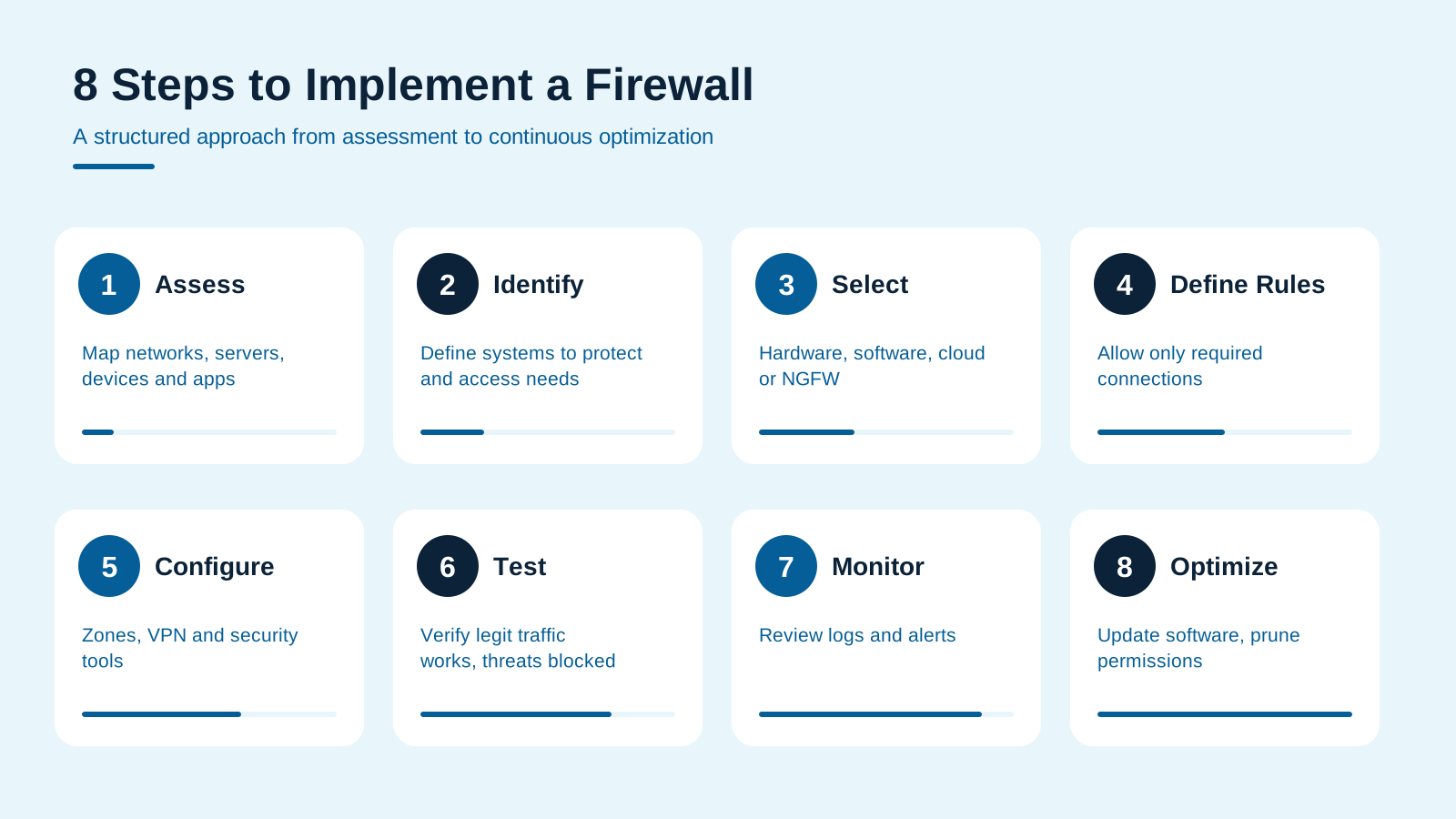
Businesses should follow a structured approach when implementing firewall solutions.
Step 1: Assess Existing Network Infrastructure
Identify business networks, servers, devices, cloud platforms, and applications.
Step 2: Identify Security Requirements
Determine which systems need protection and who should have access.
Step 3: Select the Right Firewall
Choose hardware, software, cloud-based, or next-generation firewall solutions based on business needs.
Step 4: Define Firewall Rules
Create clear policies for incoming and outgoing traffic. Allow only the connections required for business operations.
Step 5: Configure and Integrate
Configure access controls, network zones, VPN connections, and security tools.
Step 6: Test Security and Performance
Check whether legitimate connections work and unauthorized traffic is blocked.
Step 7: Monitor Network Activity
Review logs and alerts to identify suspicious connections.
Step 8: Update and Optimize
Regularly review firewall rules, update software, and remove unnecessary permissions.
Market Impact and Future of Network Firewall Security
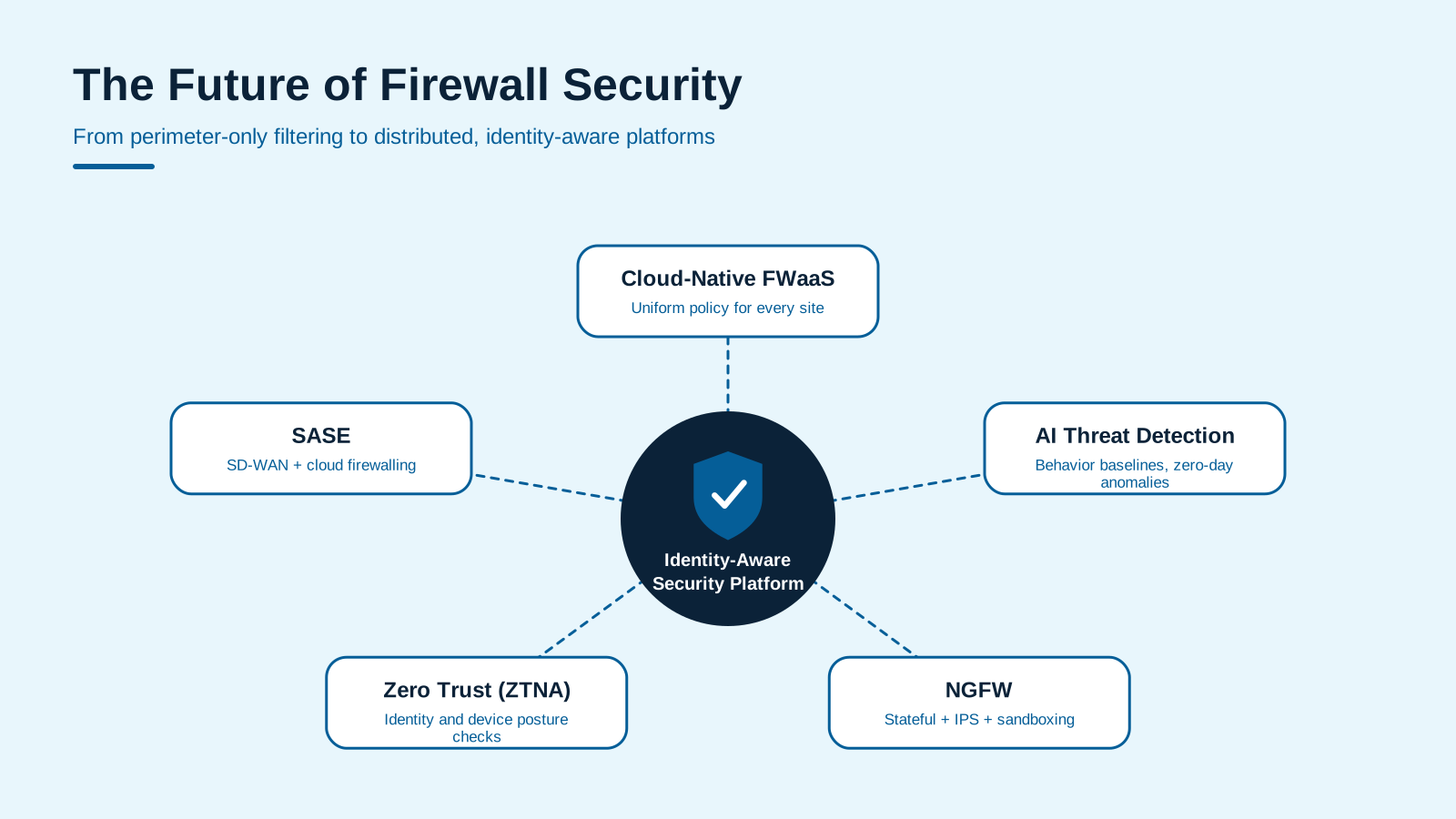
As businesses adopt hybrid cloud architectures, SaaS platforms, and remote work, traditional perimeter-only firewalls are evolving into distributed, identity-aware security platforms:
- Cloud-Native Firewalls (FWaaS): Organizations are shifting away from backhauling branch traffic through physical data centers, relying instead on cloud firewalls to enforce uniform policies across distributed offices and cloud workloads.
- AI-Powered Threat Detection: Modern firewalls leverage machine learning to baseline normal network behavior, detect zero-day anomalies in encrypted traffic, and automate incident triage.
- Next-Generation Firewalls (NGFWs): NGFWs remain the enterprise standard by consolidating stateful filtering, Intrusion Prevention Systems (IPS), sandboxing, and application-level visibility into a single platform.
- Zero Trust Network Access (ZTNA): Rather than trusting any user inside the corporate LAN, Zero Trust architectures pair firewalls with continuous identity and device-posture verification before granting access to specific applications.
- SASE and Policy Automation: Secure Access Service Edge (SASE) converges SD-WAN networking with cloud firewalling, while automated policy management eliminates redundant rules and reduces configuration errors.
Network Security Firewall Solutions with Wisdom Square Technologies
Deploying a firewall is only the first step—maintaining strong perimeter and internal defense requires continuous monitoring, rule optimization, and coordinated threat response. Wisdom Square Technologies (WST) helps businesses design, deploy, and manage resilient network security architectures tailored to their operational needs:
- Network & Email Security: End-to-end firewall deployment, gateway hardening, and communication security to block unauthorized intrusions and phishing vectors.
- 24/7 Security Operations Center (SOC): Continuous real-time monitoring and incident response to detect and contain suspicious traffic around the clock.
- SIEM Services: Centralized log collection and event correlation across firewalls, servers, and endpoints for faster threat investigation.
- Endpoint Security & Vulnerability Management: Layered protection for employee devices alongside proactive scanning to patch open ports and system weaknesses before attackers exploit them.
- Cloud & Infrastructure Services: Secure hybrid and cloud network architecture to protect distributed teams and cloud workloads.
Conclusion
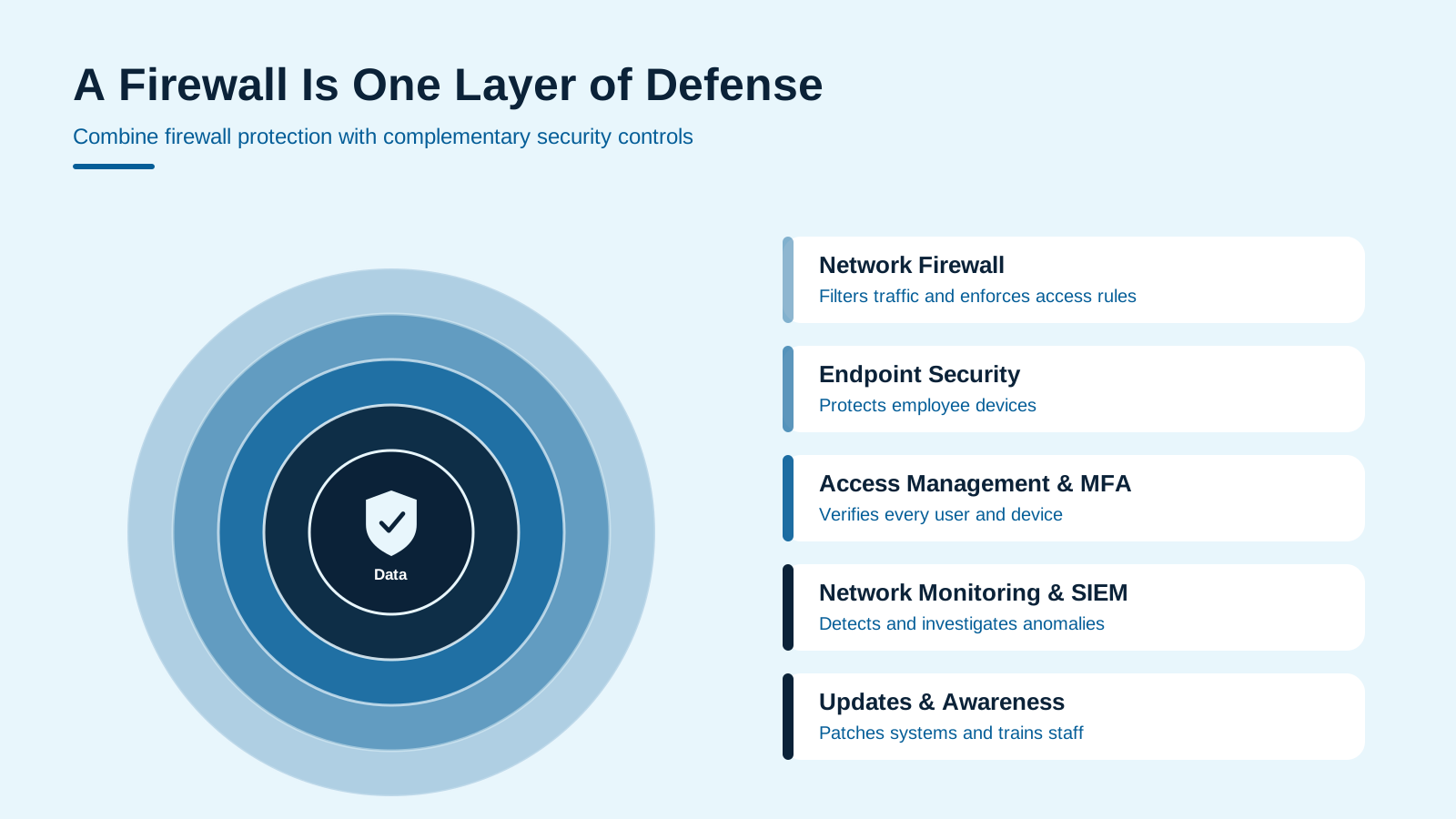
A network security firewall is an important part of protecting business networks from unauthorized access and suspicious traffic. It helps organizations control connections, monitor network activity, and protect important systems.
However, firewalls alone cannot prevent every cyberattack. Businesses should combine firewall protection with endpoint security, network monitoring, access management, and regular updates.
Wisdom Square Technologies provides cybersecurity and IT infrastructure capabilities to help businesses strengthen their security environments. Contact WST to discuss your network security requirements.
Ready to take the next step?
Frequently Asked Questions
It helps protect business networks by blocking unauthorized connections, filtering suspicious traffic, monitoring network activity, and controlling access to company resources.
Common types include packet-filtering firewalls, stateful inspection firewalls, proxy firewalls, circuit-level gateways, next-generation firewalls, web application firewalls, and cloud-based firewalls.
A traditional firewall mainly filters traffic using IP addresses, ports, and protocols. An NGFW adds advanced features such as application inspection, intrusion prevention, and threat detection.
Many businesses use both. Hardware firewalls protect the overall network, while software firewalls provide additional protection for individual computers and servers.
Firewall rules should be reviewed regularly and updated whenever business applications, users, or network requirements change. Unnecessary rules should also be removed.
No. A firewall helps block unauthorized access and certain malicious traffic, but businesses also need endpoint security, multi-factor authentication, regular software updates, and employee security awareness.