AI-powered ERP modernization involves updating ERP systems, data, integrations, and workflows so businesses can support AI, automation, advanced analytics, and changing operational requirements.
AI-Powered ERP Modernization: What Businesses Should Modernize First
Listen to this article
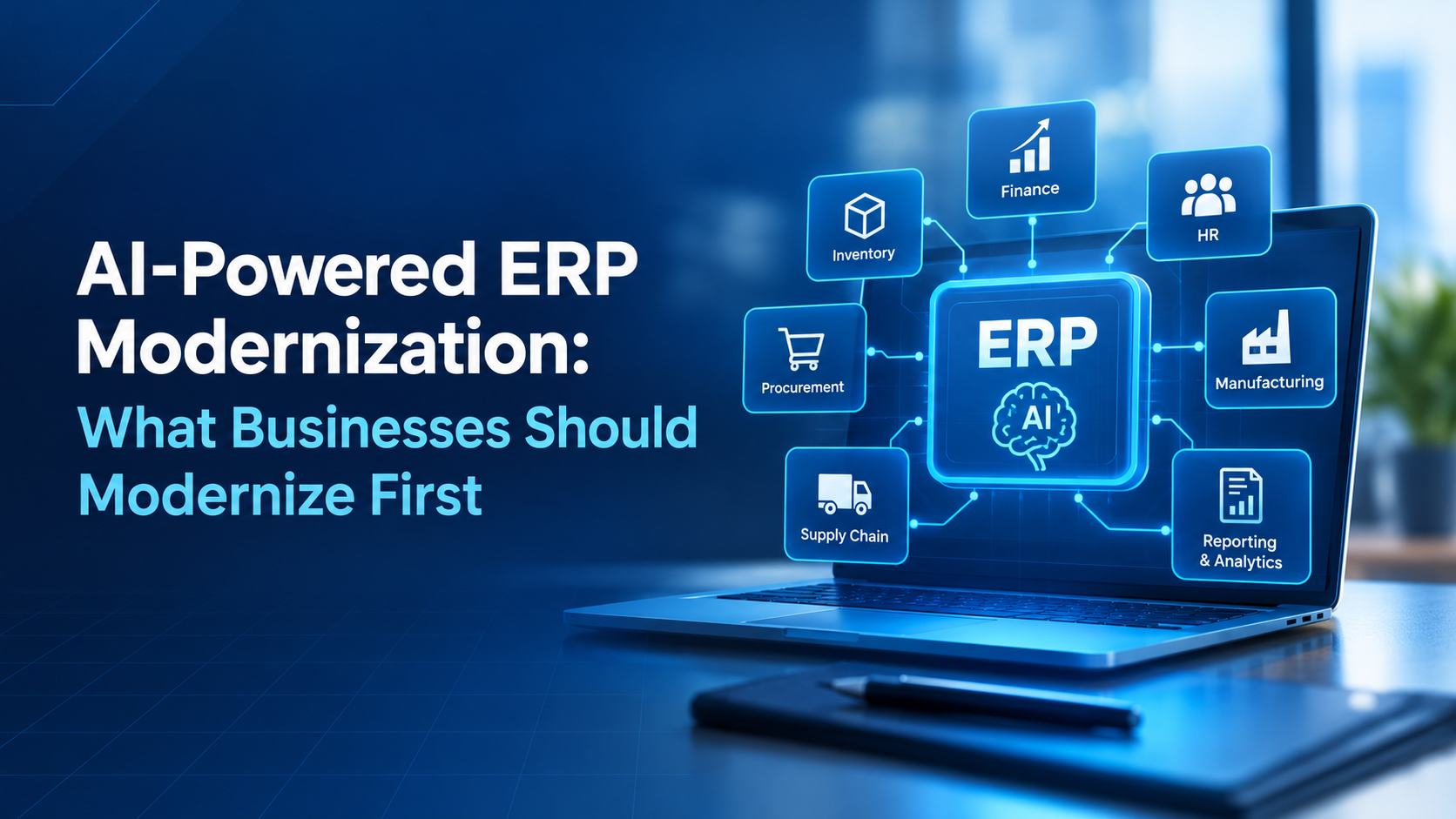
Enterprise resource planning (ERP) systems help businesses manage finance, inventory, procurement, supply chains, and other essential operations. But when these systems rely on outdated software, disconnected data, or manual processes, it becomes harder to respond quickly to changing business needs.
ERP is creating new opportunities to improve ERP systems through intelligent automation, faster reporting, predictive insights, and better decision-making. However, adding AI to an outdated ERP system does not automatically solve existing problems. Businesses first need to identify which parts of their systems are holding them back.
The key is to modernize in the right order. By improving data quality, simplifying workflows, strengthening integrations, and addressing security gaps, businesses can build a stronger foundation for AI.
Table of Contents
What Is AI-Powered ERP Modernization?
AI-powered ERP modernization is the process of updating existing ERP systems, business processes, and data infrastructure so they can support modern technologies such as artificial intelligence, machine learning, and intelligent automation.
Traditional ERP systems mainly record transactions and help employees manage routine operations. A modernized ERP environment can also analyze business data, identify patterns, recommend actions, and automate selected tasks.
For example, an AI-enabled ERP system may help a finance team identify unusual transactions, assist procurement teams with demand forecasting, or alert inventory managers when stock levels could become a problem.
Modernization does not always require replacing the entire ERP platform. Businesses may be able to improve their existing system through targeted upgrades, better integrations, process automation, or a gradual move to cloud infrastructure.
The right approach depends on the current system, business priorities, budget, and long-term technology plans.
Why Businesses Need to Modernize ERP Systems
ERP systems often become more complicated as businesses grow. New departments, acquisitions, software integrations, and customized workflows can create technical challenges over time.
Here are some common reasons businesses consider ERP modernization.
Outdated Systems Limit Flexibility
Legacy ERP systems may depend on older infrastructure, unsupported components, or custom code that is difficult to maintain. Even small changes can require significant development work.
Modernization can simplify the system and make it easier to introduce new capabilities as business needs change.
Disconnected Data Slows Decision-Making
When finance, sales, inventory, and procurement use separate systems, employees may struggle to access consistent information.
This can lead to duplicate records, manual reconciliation, and delayed reports. AI tools also depend on reliable, relevant data to produce useful results.
Manual Workflows Increase Operational Effort
Many ERP processes still involve repetitive data entry, document checks, approval routing, and spreadsheet-based reporting.
Automating suitable tasks can reduce repetitive work and allow employees to focus on exceptions, analysis, and decisions that require human judgment.
Growing AI Requirements Create New Challenges
Businesses exploring AI need systems that provide appropriate data access, consistent business rules, secure integrations, and clear controls.
Without these foundations, AI initiatives may remain limited to isolated experiments instead of becoming useful parts of everyday operations.
What Should Businesses Modernize First?
The best starting point is not necessarily the oldest application or the most expensive system. Businesses should prioritize the areas that create the greatest operational friction or prevent them from achieving important goals.
Data Quality and Data Integration
Start here if your business struggles with inconsistent reports, duplicate records, or disconnected systems.
Data is one of the most important foundations for AI-powered ERP modernization. If customer records, supplier details, product information, or financial data are inaccurate, AI-generated insights may also be unreliable.
Businesses should begin by identifying duplicate records, standardizing important data fields, reviewing data ownership, and establishing rules for maintaining data quality.
They should also examine how information moves between ERP systems, customer relationship management (CRM) platforms, warehouse applications, and analytics tools.
For example, a distributor may have different product codes in its ERP and inventory systems. Connecting the systems without resolving those inconsistencies could produce inaccurate stock reports.
A better approach is to establish consistent product records first, then improve integration and reporting.
Business Processes and Manual Workflows
Next, identify repetitive processes that consume time or create avoidable errors.
Modernizing an inefficient workflow without changing how it operates can simply move the same problems into newer software.
Businesses should map important processes from beginning to end, identify unnecessary approvals, remove duplicate data entry, and standardize activities where appropriate.
Common candidates include:
- Invoice processing and payment preparation
- Purchase order creation and approval
- Inventory replenishment
- Expense review and reconciliation
- Sales order processing
- Routine financial reporting
For instance, an accounts payable team may manually compare invoices against purchase orders and receiving records. A modernized workflow could use automation to extract invoice details, flag discrepancies, and route exceptions to the right employee.
The goal is not to automate every task. It is to simplify the process first and then automate the parts where technology adds clear value.
Legacy Applications and ERP Customizations
Review which parts of the existing ERP system are difficult to maintain or upgrade.
Over time, businesses may accumulate custom features, workarounds, and separate applications that make their ERP environment harder to manage.
Some customizations may still support important business requirements. Others may duplicate standard features or create unnecessary complexity.
Businesses should classify these customizations into three groups:
- Keep: Features that provide genuine business value and cannot be replaced easily.
- Simplify: Features that can be handled through standard ERP functionality or improved processes.
- Replace: Outdated components that create significant maintenance, compatibility, or security challenges.
Where possible, businesses should separate business-specific extensions from the ERP core. This can make future upgrades easier and reduce the risk of new features disrupting essential operations.
A complete ERP replacement may be necessary in some cases, but it should follow a structured assessment rather than being the default choice.
System Integrations and APIs
ERP systems rarely operate alone. They exchange information with CRM platforms, payment systems, e-commerce applications, logistics providers, and reporting tools.
Weak integrations can create data delays, duplicate records, and manual workarounds. They can also prevent AI applications from accessing the information needed to support business decisions.
Businesses should review their existing integrations, identify outdated connections, and determine which systems need reliable, secure data exchange.
For example, a manufacturer may need its ERP system to share inventory and order information with a B2B commerce platform. Better integration can improve stock visibility and help customers receive more accurate order information.
Modern APIs and well-managed integration layers can make it easier to connect systems without creating unnecessary dependencies.
Security, Access Controls, and Governance
Security should be part of every modernization phase, not a final step.
ERP systems often contain financial records, employee information, supplier contracts, customer data, and commercially sensitive information.
Businesses should review user permissions, authentication controls, audit logs, backup procedures, and data protection requirements before expanding access to AI tools.
They should also establish clear rules about which information AI applications can access and which actions they are permitted to perform.
For example, an AI assistant might be allowed to summarize purchasing trends or flag unusual expenses without receiving permission to approve payments or change supplier bank details.
Human approval should remain in place for sensitive actions where mistakes could create financial, legal, or operational consequences.
Reporting and Analytics Infrastructure
Once data quality and integration improve, businesses can modernize reporting and analytics to support better decisions.
Traditional reports often describe what happened during a previous period. More advanced analytics can help teams identify trends, understand potential causes, and anticipate possible outcomes.
Examples include inventory demand forecasts, cash flow projections, supplier performance analysis, and production planning.
Businesses should begin with a few decisions that would benefit from better information. They can then identify the required data, reporting improvements, and AI capabilities.
This approach helps prevent investments in dashboards or AI tools that look impressive but do not solve a real business problem.
Where Can AI Make the Biggest Difference?
After addressing the most important foundation gaps, businesses can introduce AI into selected ERP workflows.
The best opportunities depend on industry, process maturity, data availability, and risk tolerance.
Finance and Accounting
AI can assist with invoice data extraction, transaction classification, reconciliation support, expense review, and financial reporting.
It can also flag unusual transactions for investigation. However, financial approvals and material accounting decisions may still require qualified human review.
Inventory and Supply Chain
AI can analyze historical sales, inventory movements, supplier lead times, and seasonal patterns to help forecast demand.
These insights may support inventory planning and early identification of potential shortages. Forecast quality still depends on the accuracy and relevance of the underlying data.
Procurement and Purchasing
AI can help compare supplier information, summarize purchasing patterns, identify unusual price changes, and prepare purchase recommendations.
Approval limits and procurement policies should continue to control purchasing decisions, especially when transactions involve significant spending.
Manufacturing and Operations
Manufacturers may use AI to analyze production data, identify recurring delays, forecast equipment maintenance needs, or highlight quality issues.
Integrating production and inventory information can also help teams understand how operational changes affect delivery schedules and resource planning.
Sales and Order Management
AI can assist with order data extraction, customer inquiry summaries, demand insights, and identification of unusual orders.
When connected to accurate ERP and CRM information, these capabilities can help sales and operations teams work from more consistent information.
Across all these areas, businesses should begin with focused use cases that have measurable benefits and manageable risks. Expanding automation should depend on actual results, not simply the availability of new AI features.
How to Build an ERP Modernization Roadmap
A structured roadmap helps businesses modernize their ERP environment without disrupting critical operations.
Step 1: Assess the Current ERP Environment
Document existing ERP applications, infrastructure, integrations, customizations, data sources, and business workflows.
Identify recurring problems such as slow reporting, frequent errors, unsupported software, and excessive manual work.
Step 2: Set Business Priorities
Choose clear objectives, such as improving inventory accuracy, reducing invoice processing delays, or strengthening financial reporting.
Priorities should reflect business impact, implementation effort, risk, and dependencies not just technical preferences.
Step 3: Fix Foundational Issues
Address the data quality, process, integration, and security gaps that could prevent modernization from succeeding.
These improvements also help establish whether the current ERP system can support the required capabilities or needs a larger upgrade or replacement.
Step 4: Select a Pilot Use Case
Choose one manageable process where AI or automation can address a clearly defined problem.
For example, a company could pilot invoice data extraction and exception detection before expanding automation to other finance workflows.
Step 5: Measure and Improve
Compare results against the original baseline. Review accuracy, processing time, exception rates, employee feedback, and operating costs.
Use the findings to refine the workflow before expanding to other departments.
Step 6: Scale with Appropriate Controls
Once the pilot demonstrates value, extend the approach to additional processes where suitable.
Maintain access controls, monitoring, employee training, and human oversight for high-impact decisions.
Businesses undertaking broader modernization may also benefit from a structured digital transformation strategy that aligns technology investments with operational goals.
Common ERP Modernization Mistakes
Even well-funded projects can struggle when businesses focus on technology before understanding their requirements.
Replacing Everything at Once
A full replacement may be appropriate for some organizations, but a large-scale change introduces migration, integration, training, and operational risks.
Evaluate whether targeted modernization can solve the immediate problems before committing to a complete replacement.
Adding AI Before Fixing Data Problems
AI cannot reliably compensate for missing records, conflicting data, or poorly defined business rules.
Improve data quality and access controls before depending on AI for important operational decisions.
Automating Inefficient Processes
Automating a complicated workflow can make unnecessary steps happen faster without improving the overall process.
Simplify and standardize the workflow before introducing automation.
Ignoring Employees and Change Management
ERP modernization affects how people perform their daily work. Employees may need new training, revised procedures, and time to adapt.
Involve the teams that use the system, communicate changes early, and gather feedback throughout implementation.
Measuring Success Only by Technical Delivery
Completing an upgrade does not automatically mean the business has achieved its goals.
Track operational outcomes such as processing time, reporting accuracy, inventory discrepancies, system reliability, and employee adoption.
How to Measure ERP Modernization Success
Businesses should establish baseline measurements before making changes so they can assess whether modernization is delivering meaningful results.
Useful metrics include:
- Process efficiency: Time required to complete important workflows.
- Data quality: Frequency of duplicate, missing, or inaccurate records.
- Automation performance: Percentage of tasks completed automatically and rate of exceptions requiring human intervention.
- Reporting speed: Time required to prepare and validate business reports.
- System reliability: Availability, error rates, and frequency of integration failures.
- Cost and business value: Changes in operating costs, rework, and measurable business outcomes.
- User adoption: Employee usage, training completion, and feedback.
The right metrics depend on the modernization goal. A finance automation project may focus on invoice cycle time and exception rates, while a supply chain project may prioritize forecast accuracy and stock availability.
Businesses should review these measures regularly and adjust their roadmap based on evidence.
Conclusion
AI-powered ERP modernization is not simply about adopting new software or adding intelligent features. It is about building a more reliable, connected, and adaptable foundation for business operations.
For many businesses, the best starting points are data quality, process simplification, legacy system complexity, integrations, and security. Once these foundations are in place, AI can help improve selected workflows across finance, procurement, inventory, manufacturing, and reporting.
A phased approach allows businesses to address the most important problems first, measure results, and expand modernization based on demonstrated value.
With the right priorities and governance, ERP modernization can help businesses make better use of their existing systems while preparing for future AI capabilities.
Ready to take the next step?
Frequently Asked Questions
Businesses should start by assessing their most significant operational problems. Data quality, process inefficiencies, disconnected systems, and security gaps are common priorities because they affect the reliability of later modernization work.
No. Some businesses can modernize their existing ERP through upgrades, integrations, process improvements, or targeted automation. A complete replacement may be appropriate when the existing platform cannot meet critical business or technical requirements.
AI can help analyze business data, automate selected repetitive tasks, identify anomalies, support forecasting, and generate useful insights. Its effectiveness depends on data quality, system integration, appropriate controls, and the specific business use case.
In some cases, yes. AI capabilities can sometimes connect through APIs, integration platforms, or separate application layers. However, compatibility, security, data access, performance, and support requirements should be assessed before implementation.
The timeline depends on the size and complexity of the ERP environment, the amount of customization, data migration requirements, and the scope of changes. A focused improvement may take substantially less time than a complete ERP replacement. Businesses should establish timelines after assessing their current environment.
Businesses can compare implementation and operating costs against measurable improvements such as reduced processing time, fewer errors, lower rework, better inventory management, and improved reporting. Establishing baseline metrics before implementation makes the results easier to evaluate.