AI-powered employee training uses artificial intelligence to personalize learning, answer questions, generate practice scenarios, provide workflow guidance, and help identify knowledge gaps. It can support both formal training programs and everyday employee learning.
AI-Powered Employee Training for Complex Business Processes
Listen to this article
Complex business processes are not always easy to learn. Employees may need to follow multiple steps, use different software systems, understand company policies, and make decisions based on specific situations. Even experienced employees can struggle when procedures change or the work involves unfamiliar scenarios.
Traditional training methods, such as lengthy manuals, recorded presentations, and one-time classroom sessions, do not always prepare employees for these challenges. Employees may understand the instructions during training but find it difficult to apply them when handling real tasks.
AI-powered employee training offers another approach. It can provide personalized learning materials, simulate real workplace situations, answer questions, and guide employees through complex procedures.
For businesses, the goal is not simply to introduce AI into training. It is to help employees understand processes, practice their skills, and perform their work more accurately and confidently.
Table of Contents
- What Is AI-Powered Employee Training?
- Why Complex Business Processes Are Difficult to Learn
- How AI Makes Employee Training More Effective
- Real-World Applications of AI-Powered Training
- Benefits for Businesses
- How to Implement AI-Powered Employee Training
- Challenges and Best Practices
- How to Measure Training Success
- Conclusion
- Frequently Asked Questions
What Is AI-Powered Employee Training?
AI-powered employee training uses artificial intelligence to create, personalize, deliver, or support workplace learning. It can combine conversational AI, machine learning, knowledge retrieval, simulations, and workflow guidance to help employees learn business procedures.
Unlike traditional training that gives every employee the same materials, AI-powered training can adapt to a person's role, experience, learning progress, and specific questions.
For example, a new finance employee may need guidance on invoice processing, approval limits, and exception handling. An AI training assistant can explain each step, provide practice scenarios, and answer questions using approved company documentation.
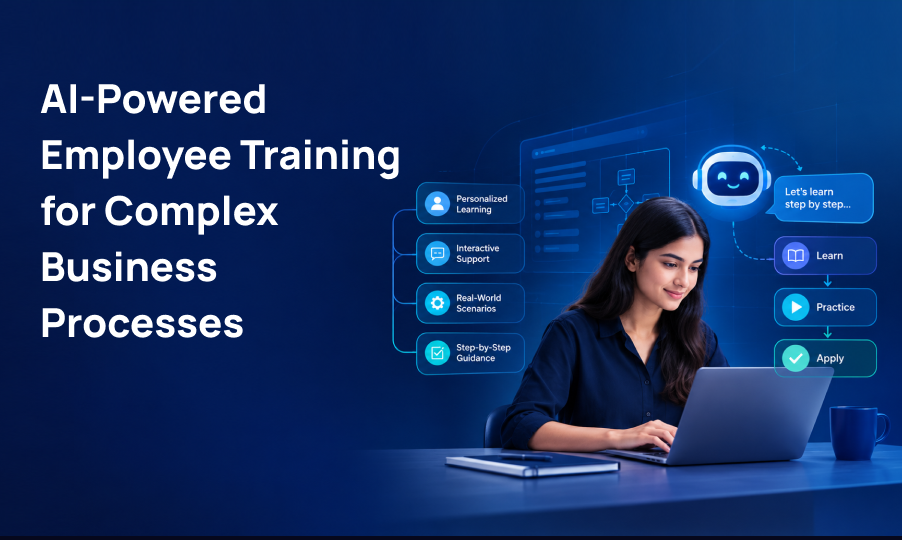
AI-powered training can support several learning activities:
- Personalized learning: Adjusting training content to an employee's role and skill gaps.
- Interactive assistance: Answering questions about approved procedures and company policies.
- Scenario-based practice: Simulating situations employees may encounter at work.
- Step-by-step guidance: Explaining complex workflows in manageable stages.
- Progress tracking: Helping training teams identify areas where employees need additional support.
These capabilities can be particularly useful when employees must learn detailed procedures or work across multiple enterprise applications.
Why Complex Business Processes Are Difficult to Learn
Business processes often involve more than remembering a list of instructions. Employees need to understand what to do, when to do it, which systems to use, and how to respond when something goes wrong.
Several challenges can make this difficult.
Too Many Steps and Rules
Processes such as procurement, insurance claims, financial reconciliation, and regulatory reporting may involve several approvals, documentation requirements, and decision points.
Employees must remember the correct sequence while ensuring that every required step is completed.
Training Materials Become Outdated
Business procedures change as companies introduce new software, update policies, or respond to new requirements. When training materials are not updated at the same pace, employees may follow outdated instructions.
Employees Have Different Learning Needs
A new employee may need detailed explanations, while an experienced team member may only need help with an unfamiliar exception.
Using the same training program for everyone can leave some employees overwhelmed and others without enough support.
Mistakes Can Affect Business Operations
Errors in complex workflows can lead to incorrect records, delayed approvals, compliance issues, rework, or poor customer experiences.
Employees need opportunities to practice difficult situations before they encounter them in live operations.
Employees May Forget What They Learned
Training is often separated from the actual work. When employees need to apply a procedure days or weeks later, they may struggle to remember every step.
AI-powered learning can help address these challenges by making training more interactive, relevant, and accessible when employees need it.
How AI Makes Employee Training More Effective
AI can improve different stages of the employee learning process, from creating training materials to providing assistance during daily work.
Personalized Learning Paths
AI can help identify gaps in an employee's knowledge and recommend relevant learning activities.
For example, an employee who understands basic purchase order creation but struggles with supplier exceptions may receive additional training on exception handling instead of repeating the entire procurement course.
Training teams can use assessments, employee feedback, and learning records to determine which topics require more attention.
Personalization should be based on relevant, reliable information and should give employees a clear understanding of their learning goals.
AI-Powered Practice Scenarios
Employees often learn complex procedures more effectively when they can practice applying them.
AI-powered simulations can present realistic workplace situations and allow employees to choose how they would respond. The system can then explain the consequences of their choices and provide feedback.
For example, a customer support employee might practice handling a billing dispute, while a procurement employee could work through a scenario involving an incomplete supplier document.
These exercises give employees a chance to practice without affecting live business operations.
Conversational Training Assistants
Employees may have questions that are not fully addressed in standard training materials.
An AI training assistant can answer questions in natural language, explain company procedures, and direct employees to relevant documentation.
For instance, an employee could ask, "What should I do if an invoice amount does not match the purchase order?"
The assistant could retrieve the approved procedure, explain the next steps, and identify when the employee should escalate the issue to a manager.
To improve reliability, these assistants should use approved internal sources, provide links to supporting documentation where possible, and acknowledge when an answer cannot be verified.
Step-by-Step Workflow Guidance
Some processes are difficult because employees must remember the correct sequence of actions across several applications.
AI can help break a procedure into smaller steps and explain what information is required at each stage.
Consider an employee processing a customer order. The workflow may involve checking customer details, confirming inventory, reviewing payment status, and preparing the order for fulfillment.
A training assistant can explain these steps and help employees understand the conditions that must be met before proceeding.
Where guidance is delivered inside a live business application, organizations should distinguish training support from actual system permissions or automated execution.
Faster Training Content Development
Creating and updating training materials can require significant effort from subject matter experts and learning teams.
AI can help draft process explanations, summarize approved documentation, generate practice questions, and adapt content for different employee roles.
For example, a long internal procedure can be converted into a short reference guide and a set of practice scenarios.
However, AI-generated content should be reviewed by knowledgeable employees before publication. This is especially important for financial, legal, safety-related, and compliance-sensitive procedures.
Continuous Feedback and Skill Development
Traditional training often measures whether employees completed a course or passed a quiz.
AI-supported training can provide more detailed feedback about recurring mistakes, topics that require additional practice, and areas where employees are progressing.
Training managers can use these insights to improve learning materials and provide targeted coaching.
The goal is to identify learning needs and support improvement not to treat every training interaction as a complete measure of employee performance.
Real-World Applications of AI-Powered Employee Training
AI-powered training can support a wide range of business functions. The most useful applications are those where employees need to learn detailed procedures, make decisions, or work with several connected systems.
Finance and Accounting
Finance teams often follow structured procedures for invoice processing, expense reviews, reconciliation, and financial reporting.
AI training can help employees understand approval rules, required documentation, exception handling, and common sources of error.
For example, a training simulation can present an invoice with missing information and ask the employee to identify the appropriate next step.
Human Resources and Employee Onboarding
New employees need to learn company policies, internal systems, approval procedures, and role-specific responsibilities.
AI assistants can answer routine questions, recommend relevant learning materials, and guide new hires through onboarding activities.
HR teams should ensure that answers come from current, approved policies and that sensitive employee information is handled appropriately.
Customer Service and Support
Customer service employees must learn how to handle different customer needs, follow escalation procedures, and use support systems correctly.
AI role-play can simulate difficult conversations, while training assistants can explain approved troubleshooting steps.
Employees can practice responding to unusual situations before handling them independently.
Procurement and Supply Chain
Procurement workflows may involve supplier onboarding, purchase requests, contract checks, approvals, and delivery coordination.
AI-powered training can explain how these steps connect and help employees practice responding to missing documents, delayed deliveries, or discrepancies.
This can be particularly useful for organizations with complex purchasing rules or multiple approval levels.
Insurance and Claims Operations
Insurance employees may need to follow detailed procedures for claim intake, document verification, policy checks, and escalation.
AI can create practice scenarios using fictional claim information, helping employees understand documentation requirements and recognize when a case needs further review.
Training systems should avoid exposing real customer records unnecessarily and should preserve human oversight for decisions that require professional judgment.
ERP and Enterprise Software Training
Employees often struggle when business processes require them to move between ERP modules, CRM platforms, inventory systems, and reporting tools.
AI training assistants can explain how to complete specific tasks, provide guided practice, and answer questions about approved workflows.
For example, an employee learning a new ERP system could practice creating a purchase request, checking its approval status, and understanding how the transaction affects downstream operations.
This approach can complement broader digital transformation initiatives by helping employees adapt to new systems and processes.
Benefits of AI-Powered Employee Training
When implemented carefully, AI-powered training can offer several practical benefits.
More Relevant Learning Experiences
Employees can focus on the topics they need to understand instead of repeating material they already know.
More Opportunities to Practice
Simulations allow employees to rehearse complex or unusual situations in a controlled environment.
Training Support When Questions Arise
Employees can access explanations and approved reference materials without always waiting for a trainer or manager.
More Consistent Process Guidance
A well-designed AI assistant can provide consistent explanations based on approved documentation, reducing reliance on informal instructions.
Easier Updates to Training Materials
AI can help training teams identify content that needs revision and prepare updated drafts when procedures change.
Better Visibility Into Learning Gaps
Training managers can use assessment results and learner feedback to identify where additional instruction or process clarification may be needed.
These benefits are not automatic. Results depend on the quality of the training content, the design of the learning experience, employee adoption, and the controls surrounding AI-generated guidance.
How to Implement AI-Powered Employee Training
Businesses do not need to introduce AI across every training program at once. A focused rollout can help them understand what works before expanding to additional teams.
Step 1: Identify the Most Difficult Processes
Start by identifying workflows that require extensive training, involve frequent questions, or generate recurring errors.
Examples include invoice processing, employee onboarding, customer support escalation, and ERP transactions.
Speak with employees, managers, and subject matter experts to understand where people struggle and what additional support would be useful.
Step 2: Document the Existing Process
Collect the current procedures, checklists, system instructions, policies, and training materials.
Remove outdated guidance and resolve conflicting instructions before using these materials to train or configure an AI assistant.
Assign ownership so someone is responsible for reviewing and updating the content.
Step 3: Choose the Right AI Training Approach
Different learning needs require different tools.
- Use conversational assistants when employees need explanations and answers to routine questions.
- Use simulations when employees need to practice decisions or conversations.
- Use personalized learning paths when skill gaps differ across employees.
- Use workflow guidance when employees need help understanding a sequence of actions.
Some organizations may benefit from combining these capabilities within an existing learning management system or enterprise application.
Step 4: Establish Data and Security Controls
Before implementation, determine which information the AI system can access and what it must not expose.
Use appropriate permissions, approved knowledge sources, and safeguards for confidential company information and personal data.
For high-risk processes, ensure that the AI assistant cannot independently approve transactions, change sensitive records, or bypass established controls.
Step 5: Run a Pilot Program
Choose one team and a manageable set of training tasks.
For example, a business could pilot an AI assistant for invoice exception training with a group of finance employees.
Collect feedback from employees and trainers, review answer quality, and check whether the tool helps employees complete the learning objectives.
Step 6: Measure Results and Improve
Compare pilot results against the original training baseline.
Review learning assessments, error rates, time to proficiency, employee feedback, and the frequency of questions requiring human assistance.
Use these findings to improve the training content and decide whether the approach should be expanded.
Step 7: Expand Gradually
Once the pilot demonstrates value, introduce the approach to additional workflows and departments.
Continue reviewing AI responses, updating documentation, training employees on appropriate use, and monitoring whether the system remains effective as business processes change.
Challenges and Best Practices
AI-powered employee training can improve learning, but businesses need to address several challenges to make it reliable.
Inaccurate or Outdated Guidance
An AI assistant may produce an incorrect answer if its source material is incomplete or outdated.
Best practice: Use approved internal documentation, assign content owners, review important answers, and provide a way for employees to report errors.
Sensitive Business Information
Training tools may process employee records, customer data, financial information, or confidential procedures.
Best practice: Apply access controls, minimize unnecessary data exposure, assess vendor security practices, and use fictional or anonymized information in practice scenarios whenever possible.
Overreliance on AI
Employees may accept an AI-generated answer without checking whether it is correct or appropriate for the situation.
Best practice: Teach employees how to verify guidance, recognize uncertainty, and escalate high-risk questions to qualified people.
Resistance to New Training Methods
Employees may be unfamiliar with AI tools or worry that training interactions will be used to monitor their performance unfairly.
Best practice: Explain the purpose of the system, provide clear usage guidelines, and involve employees in testing and improving the experience.
Difficulty Measuring Business Impact
High course-completion rates do not necessarily mean employees can perform a process correctly.
Best practice: Measure practical skills, workflow accuracy, error frequency, time to proficiency, and employee confidence alongside course completion.
Maintaining Human Oversight
AI can support learning, but it should not replace expert judgment in situations involving safety, compliance, financial risk, or complex exceptions.
Best practice: Define when employees must seek human assistance and ensure that the escalation process is easy to follow.
How to Measure AI-Powered Employee Training Success
Businesses should define success before introducing an AI training system. This helps distinguish useful learning improvements from activity that looks impressive but has little operational value.
Consider tracking these metrics:
- Time to proficiency: How long it takes an employee to perform a task independently at the required standard.
- Process accuracy: How often employees complete workflows correctly.
- Error and rework rates: Whether training is associated with fewer mistakes and repeated tasks.
- Knowledge retention: Whether employees can apply what they learned after a period of time.
- Training completion: Whether employees complete required learning activities.
- Employee feedback: Whether employees find the training relevant, clear, and useful.
- Support requests: Whether routine questions decrease or become easier to resolve.
- Cost per learner: The cost of developing, delivering, and maintaining the training program.
For example, if a company introduces AI-guided training for a procurement workflow, it could compare processing accuracy and time to proficiency before and after the pilot.
Businesses should account for factors such as process changes, employee experience, and workload when interpreting results. A measured improvement should not automatically be attributed to AI without considering other changes.
Conclusion
AI-powered employee training gives businesses new ways to teach complex processes, personalize learning, and support employees as they perform their work.
From finance and procurement to customer service and ERP operations, AI can help employees practice difficult scenarios, understand approved procedures, and access guidance when questions arise.
Successful implementation starts with a clear business problem, reliable training materials, appropriate security controls, and a focused pilot. Businesses should measure practical improvements rather than relying only on course completion or technology adoption.
AI works best as a learning partner that supports employees and trainers not as a replacement for subject matter expertise or human judgment. With the right approach, organizations can build more adaptable training programs that help employees learn complex workflows and apply their knowledge more confidently.
Ready to take the next step?
Frequently Asked Questions
AI can break procedures into manageable steps, explain approved instructions, simulate workplace situations, and provide feedback. This helps employees practice applying their knowledge rather than only reading or watching training materials.
AI can support and improve traditional training, but it does not replace every role of a trainer. Human instructors and subject matter experts remain important for mentoring, complex explanations, evaluating judgment, and handling sensitive or high-risk situations.
Suitable examples include employee onboarding, finance and accounting workflows, procurement, customer support, insurance claims procedures, compliance training, and ERP system usage. The best starting point is a process with clear learning objectives and reliable documentation.
Yes. Smaller businesses can start with a limited use case, such as an internal knowledge assistant or interactive onboarding guide. They should evaluate implementation costs, data protection, integration requirements, and expected business value before expanding.
Businesses can measure time to proficiency, workflow accuracy, error rates, knowledge retention, employee feedback, and training costs. Comparing these metrics with a baseline helps determine whether the program is producing useful results.
It can be implemented with appropriate safeguards, but security depends on the chosen platform, configuration, data access, and vendor practices. Businesses should use approved information sources, restrict access to sensitive data, review retention policies, and maintain human oversight for high-risk activities.